


FAQ: AI hardware for notebooks and PCs
Special AI chips, graphics hardware and specialized arithmetic units in CPUs are designed to accelerate AI applications. The benefits of which vary greatly.

(Image: Shutterstock/Alexander Supertramp)
AMD, Apple, Intel, Nvidia and Qualcomm advertise the special AI functions of their chips. Apple and Microsoft, on the other hand, advertise the AI functions of their operating systems, i.e. Apple Intelligence and Copilot+. There's a lot of confusion when it comes to artificial intelligence, so let's break it down.
What are the benefits of AI computing systems?
What exactly can AI accelerators do better than normal CPU cores?
Many AI algorithms require very high computing power, but mostly get by with two very specific functions: the multiplication of large matrices and a subsequent addition, called Matrix Multiply Accumulate (MMA). A module specifically optimized for these computing steps processes the data much faster and at the same time more energy-efficiently than a general-purpose processor core. However, this only works in practice if several conditions are met.
Compatibility of AI apps and accelerators
Can any AI software use any AI accelerator?
No, and this is the crux of the matter: in order to be able to use a specific AI engine, an AI app must be specifically programmed for it. Unfortunately, the different AI computing units in chips from AMD, Apple, Intel, Nvidia and Qualcomm are not binary compatible with each other. Worse still, some chips contain two or three different AI computing units. They are integrated into the respective operating system via drivers, and there are also standardized programming interfaces (APIs) and compatible AI frameworks. However, some AI apps only cooperate with certain AI units or certain APIs, while others are useless for them.

AI programming interfaces
How do I find out which AI software makes optimum use of my hardware?
That is difficult. Many software companies won't even tell you which application programming interface (API) their AI app uses. And even with this information, it is difficult to estimate how well the app will run on a particular computer. This is because performance varies enormously depending on the combination of AI framework, AI API, drivers and hardware.
AI apps typically use so-called AI frameworks such as TensorFlow, Caffe, PyTorch or Keras. These in turn use different programming interfaces such as Microsoft DirectML (Windows ML), Apple CoreML, Nvidia TensorRT, AMD AI Engine, Intel OpenVINO, Qualcomm AI Engine Direct or the generic Vulkan interface, depending on the existing AI computing units, drivers and operating systems.
Microsoft encourages programmers to use DirectML under Windows because it can be used to control AI units from different chip companies. However, benchmarks show that DirectML often achieves significantly less computing power than the API maintained by the respective hardware manufacturer itself. This applies in particular to Nvidia TensorRT and Intel's OpenVINO.
Videos by heise
What are tops?
I keep coming across the unit of measurement "tops". I have already understood that this means tera operations per second. But what does it mean?
The realization that many AI algorithms deliver good results even when they work with highly simplified values was important for the AI triumph. This is why many AI apps calculate with so-called quantized data. For example, instead of floating point values with 32 bits each (32-bit floating point, FP32), they only use FP16 or integers with 8, 6 or even just 4 bits. Such an Int8 value occupies 1 byte, i.e. only a quarter of what an FP32 value needs. And modern CPU arithmetic units such as the Advanced Vector Extensions (AVX) process much more of the "narrow" data per clock cycle. AVX-VNNI, for example, handles 256-bit vectors and alternatively processes 32 Int8 numbers in one go instead of eight FP32 values. More of the smaller data also fits into the RAM and caches.
The unit of measurement "operations per second" (ops, computing steps per second) has become established for the maximum number of data values that a computer can process per second. In AI computing units, this usually refers to the number of Int8 values processed per second in matrix multiplications, which has long been in the trillions: tera-ops, or tops for short. Many AI arithmetic units – but by no means all – also process FP16 values, but only half as fast as Int8; manufacturers then typically quote the higher value. When it comes to floating point numbers, it is more common to write flops: Floating Point Operations per Second. Without specific details of the data formats that the respective AI computing unit can process, tops values only allow very rough performance comparisons.

What AI accelerators are there?
What types of AI accelerators can be found in current Windows and macOS computers?
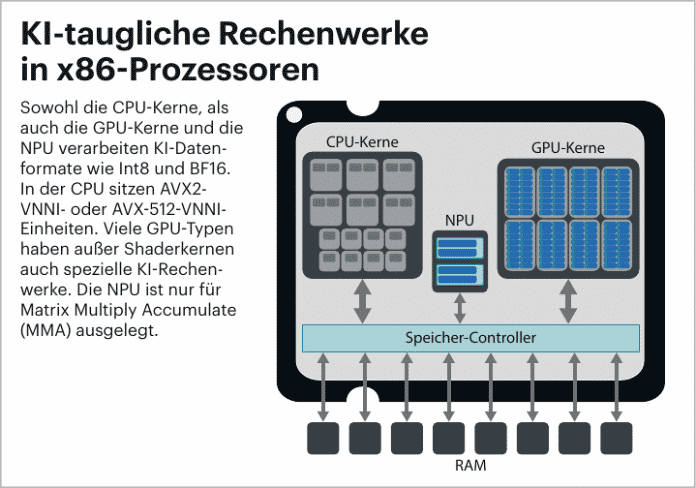
In most current x86 and ARM processors, the standard CPU cores are already optimized for AI algorithms and are therefore significantly faster than their predecessors. This is because AMD, Intel and ARM have revised their respective vector computing units (Advanced Vector Extensions, AVX, and Scalable Vector Extensions, SVE) so that they can now also process AI data formats such as BF16, FP16 or Int8. Ideally, they are two to eight times faster than older processors at the same clock frequency. The 16 CPU cores of an AMD Ryzen 9 9950X, for example, together achieve around 10 tops for Int8.
Most current processors also contain integrated graphics processors (iGPU, IGP). Although these are significantly weaker than the GPU of an expensive graphics card, they contain similar computing units which, in addition to 3D calculations and ray tracing, are now also familiar with AI data formats. The IGP of the Intel Core Ultra 9 288V mobile processor, for example, delivers 67 tops. A 300 euro Nvidia GeForce RTX 4060, on the other hand, delivers a whopping 242 tops.
In addition, all current mobile processors from AMD, Apple, Intel and Qualcomm contain separate AI computing units, so-called Neural Processing Units (NPUs). Most of them only process Int8 and FP16 values and are often weaker than the integrated GPU: Intel's NPU in the Core Ultra 100 has 13 tops, while the Core Ultra 200V has 45 tops. Microsoft requires an NPU with at least 40 tops for the "Copilot+" logo. The trick with the NPUs is that they are particularly efficient and consume little power. They are primarily intended for continuously running AI applications that should not drain the notebook battery quickly: Speech recognition, optimization of audio and video streams.
How much RAM does an AI PC need?
Does an AI PC need a particularly large amount of RAM?
There is no general answer to this question. Locally executed AI models can use significantly more RAM than Office apps, for example. This is why Microsoft requires at least 16 GB of RAM for Windows 11 computers with the Copilot+ logo. Before the introduction of Apple Intelligence, Apple also increased the minimum configuration of its Macs to 16 GB.
The previous Copilot+ notebooks and Apple computers have processors with built-in GPUs and NPUs, in which all three computing units share the available RAM. If the AI model is to run on a separate graphics card, its local memory must be large enough.

Retrofitting an AI accelerator
Can I retrofit an AI accelerator to my notebook or PC?
This works very well on desktop PCs with a free PCI Express x16 slot (PCIe x16): You can install a modern graphics card there. How powerful it can be depends not only on your budget but also on the existing power supply unit, as many graphics cards require additional power cables, especially those with a power consumption of more than 75 watts.
So far, Nvidia RTX graphics cards are particularly recommended because they not only provide relatively high AI computing power, but because Nvidia also maintains drivers and programming interfaces well. Depending on the AI app, however, cards from AMD or Intel may also be considered.
Only very few notebooks and mini PCs have sockets for graphics cards. However, there are AI accelerators in M.2 design such as the Hailo 8L with 13 tops for less than 100 euros. However, we have not yet been able to find out which AI apps use this under Linux or Windows.



(ciw)


