


Paris update: Nextcloud Talk now with desktop client and AI
Nextcloud Talk gets a desktop client with the Paris update. Generative AI to make digital meetings more efficient.
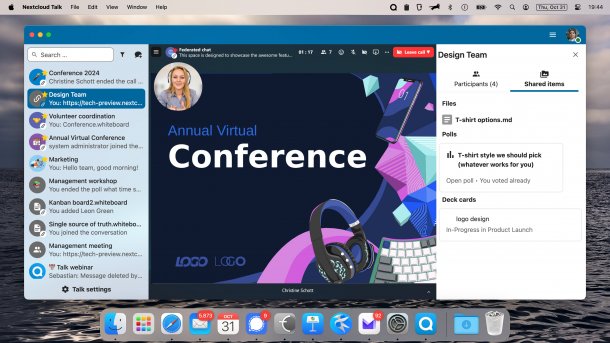
The new Nextcloud Talk desktop client is available for Windows, Linux and macOS.
(Image: Nextcloud)
The collaboration and video conferencing software Nextcloud Talk has received an extensive update with the Paris release. It now has a desktop client that is available for Windows, macOS and Linux. Other new features include an AI assistant for chats and meetings as well as an extended range of functions for video conferences and webinars. With the update for Talk, Nextcloud aims to offer an open source alternative to Microsoft Teams.
Companies can install Nextcloud Talk on their own servers or host it with cloud providers. The tool can also be used behind a firewall, in a VPN or completely isolated from the internet. This allows organizations to retain control over their own data, meet various data protection requirements, including GDPR or HIPAA, and at the same time be independent of US providers.
Generative AI writes meeting protocol
Nextcloud Talk integrates generative AI alongside the desktop client. It can be used to automatically create a transcript from recorded video conferences and summarize it in a transcript. The AI can also summarize messages in the chat. This should enable users to quickly get up to date after illness or vacation without having to read through hundreds of unread messages.
Meeting rooms have breakout rooms and a digital whiteboard on which participants can record their ideas. Files can also be shared in the chat and edited directly from there. In addition to the file formats supported in Nextcloud Office, such as Microsoft and LibreOffice, it is also possible to edit simple text files and Markdown. PDF files, videos or maps from OpenStreetMap are displayed directly in the chat. Administrators can use plug-ins to add inline support for other file formats.
In addition, multiple screens can now be shared in parallel in a meeting. The results of surveys conducted are available for download at the end of the meeting. Users can also set the suppression of echoes and background noise. Administrators can limit the duration of calls and close unused rooms after set times. In this way, employees can keep meetings as short as possible while saving server resources and bandwidth.
Talk integrates into the Nextcloud environment
The developers rely on the existing Nextcloud infrastructure for Talk. Existing installations of the Nextcloud Files cloud environment can be expanded to include the collaboration software. Users only need one account for all services. Files stored in the cloud can be shared in chats and meetings. Conversely, files shared in Talk can be accessed from the cloud interface. The assigned rights are retained.
Videos by heise
In addition to the new desktop client, users can continue to use the existing web interface and the smartphone apps for iOS and Android. The new functions are also available there.


(sfe)


