


Microsoft Notepad and Paint get more AI functions
Microsoft is distributing new Notepad and Paint versions in the preview versions for Windows Insiders. These bring more AI functions.
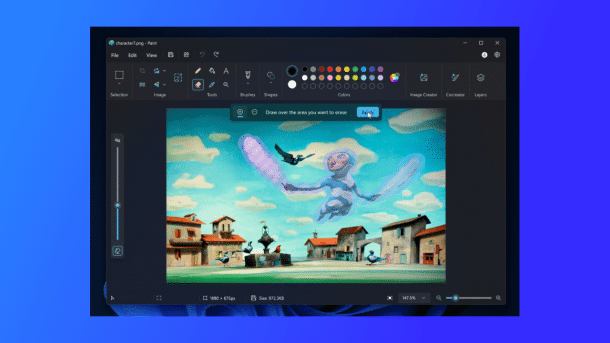
Paint gets an AI eraser for everyone.
(Image: Microsoft)
Microsoft is distributing new preview versions of Notepad and Paint in the Windows Insider channels Canary and Dev for Windows 11. These will receive new AI functions.
As the developers at Microsoft explain in a blog post, Paint is getting a generative fill function and a generative eraser from version 11.2410.28.0. To use the fill function, an image area must be selected and then "Generative fill" selected from the pop-up menu. A text box opens to accept the description of the content to be filled. A click on "Create" creates content based on this. If you are not satisfied, you can start another attempt by clicking on "Try again", and the text prompt can also be customized. The arrow keys can also be used to scroll through the individual suggestions. The generative filler is only available on Snapdragon-based Copilot+ PCs. An update of the Cocreator is also only available for this. The underlying diffusion-based model should deliver better results faster.

(Image: Microsoft)
The generative eraser, on the other hand, works like the "magic eraser" already familiar from Android smartphones. After selecting the area to be erased – a rectangle selection, for example, but free-form is also possible – the function fills the area to be erased with image information adapted to the background. The function can be used by selecting "Generative erase" while the eraser is selected.

(Image: Microsoft)
The generative erase brush can be used to mark areas that are to be removed. By selecting "Apply", Paint removes the object(s) and replaces them. This feature will be available on all Windows 11 PCs, not just those with powerful NPU accelerators, at the end of the test phase.
Videos by heise
Microsoft is now expanding the preview version of the Image Creator in Paint, which creates image content based on an AI prompt, to other regions. It is now available in Germany, France, Italy, Canada, the USA and the United Kingdom. A log-in to an existing Microsoft account is required to use it. In addition, customers with Microsoft 365 Personal, Family and Copilot Pro subscriptions in Australia, Malaysia, New Zealand, Singapore, Taiwan and Thailand can use AI Credits for the Image Creator in Paint. Microsoft uses AI Credits to pay for the use of AI functions. According to Microsoft's description, those with free apps such as Designer will receive 15 AI Credits per month. Microsoft 365 Personal and Family contain 60 AI Credits that can be used across all apps, and the Copilot Pro subscription finally enables "comprehensive use" of the AI functions, which is probably intended to mean unlimited use.
Editor with AI assistance
In addition to the artistic functions in the image area, Microsoft has also prescribed AI assistance for the writing guild. Now that a pretty decent spell checker and corrector has arrived on the endpoints, Microsoft is equipping Notepad with generative AI from version 11.2410.15.0. This helps to reformulate sentences, adjust the tone of a text and adapt the length of your own content.
The function is also very easy to use: Select the text area in question and then select the "Rewrite" option, or go to Rewrite in the menu, or use the keyboard shortcut "Ctrl" and "I" to let the AI assistant take over. The editor then creates three versions of the rewritten text for users to choose from. You can also adjust the rewrite settings and click on "Retry" to create additional variants. The original versions are retained in the current dialog so that interested parties can return to them in case of doubt. The same local availability and AI credit options as for the Image Creator in Paint also apply to the Notepad AI add-on.

At the beginning of October, Microsoft had already announced that Paint, for example, would be getting a generative eraser and filler –, but only in conjunction with Copilot+ PCs with powerful NPUs such as Snapdragon X processors from Qualcomm, Intel Core Ultra 200V (Lunar Lake) or AMD Ryzen AI 300. An upscaler for upscaling low-resolution or highly compressed source material is also to be available on such machines.


(dmk)

