


Framework launches more affordable Laptop 12 with touchscreen for education
The Framework Laptop 13 and Laptop 16 will soon be joined by the Laptop 12, which brings repairability and upgradeability to the education segment.
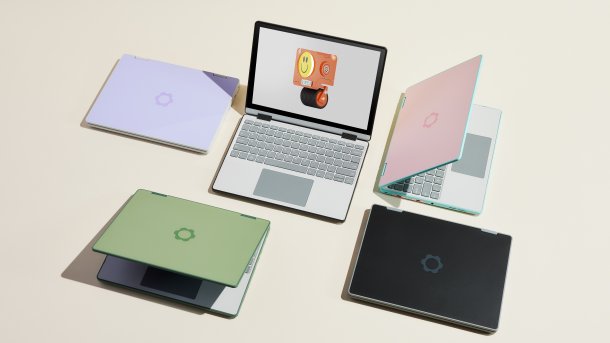
Framework puts the Laptop 12 in colorful plastic cases.
(Image: Framework)
The sustainability-focused US company Framework not only unveiled its first desktop PC yesterday, but also announced a new laptop series: the Laptop 13 and Laptop 16 will be joined by the Laptop 12 later this year. This will be a hybrid device that can be folded into a tablet thanks to 360-degree hinges. For the first time, Framework is offering a stylus-operated touchscreen, which has the eponymous diagonal of 12.2 inches (1920 × 1200 pixels, 16:10, up to 400 cd/m²).
Framework is explicitly targeting the education market with the small Laptop 12, i.e. devices used by students. However, the manufacturer has not yet announced any specific prices. They are to follow with the pre-sale in April 2025.
Instead of a full metal housing, there is a plastic one with all-round TPU shock absorbers, which should withstand tough school bag use better. The casing and stylus will be available in five different colors at launch. The stylus does not disappear into the case, so it has to be transported separately.
New mainboard format
Although the Laptop 12, like the well-known Laptop 13, is a compact notebook whose four expansion slots can be fitted with interface modules to suit personal taste, the same mainboard format is not used inside. Framework itself has not yet published much information on this, but the Youtuber Linus Sebastian from Linus Tech Tips (LTT) has already published a detailed video in which he opens up the device. (Note: Sebastian holds shares in Framework and gets information before other media professionals).

(Image: Framework/LTT)
A dedicated mainboard format for an entry-level model may seem strange, but the limited space obviously requires adjustments. For example, there is only one RAM slot, which halves the usable memory bandwidth. The WLAN module and SSD can still be replaced, but the latter is limited to the compact M.2-2230 format. However, there are also useful improvements for hobbyists: If you remove the palm rest, the electrical connections to the keyboard and touchpad are automatically disconnected thanks to pogo pins. Even the 50 Wh battery (also not cross-compatible with the Laptop 13) no longer has to be disconnected via a fiddly plug when wielding a screwdriver.
Notebooks designed for the education market usually have weaker or older CPUs in order to keep the price of the device low. Instead of using current low-end models, such as from the Celeron series, Framework uses faster but older Core i3 and Core i5 from the 13th generation. This gives interested parties good performance, but they have to do without an AI accelerator, for example. It is unclear which models with a lot of waste heat are used and also whether all four USB-C sockets speak USB4/Thunderbolt 4. Technically, the CPU generation can do this, but the high requirements to ensure signal integrity on the mainboard would be a cost driver.
Videos by heise
AI update for the Laptop 13
If you want cutting-edge performance, you have to go for the Laptop 13. This series gets a new mainboard with Ryzen AI 300 (Strix Point), which offers two DDR5 slots and space for an M.2 2280 SSD as usual. Three predefined equipment variants can be selected in Framework's webshop. Alternatively, you can assemble a Laptop 13 entirely according to your own requirements or buy the mainboard separately to upgrade an existing device. The latter works for all Laptop 13s already sold, i.e. back to the first model, which was launched on the market with the 11th Core i generation.

(Image: Framework)
As the AI unit contained in Ryzen processors is powerful enough for Copilot+ and Microsoft's hardware specifications for complete systems stipulate a Copilot button, there is now one on the keyboard. However, Framework still officially supports the use of Linux and you can also purchase keyboards without Microsoft logos.
It is unclear whether motherboards with fresh Intel CPUs will be available for the Laptop 13 at a later date. Core Ultra 200V (Lunar Lake) runs counter to Framework's celebrated upgradeability with the RAM integrated in the CPU package and therefore seems unlikely, especially as it would require a specially developed motherboard. Core Ultra 200H (Arrow Lake) fits on motherboards that are already available with Core Ultra 100H (Meteor Lake). However, the latter have only been on the market for a good six months and the upgrade to 200H would hardly bring any new features. With AMD mainboards, Framework has proven that it can also be discontinued if too little is new: there have never been mainboards with Ryzen 8040U. Instead, the AMD variant continued to be sold with Ryzen 7040U until the recent switch to Ryzen AI 300.

No update for the Laptop 16 (yet)
Framework only showed a prototype of a new keyboard with a new button for its big brother, the Laptop 16. However, the one-key prototype does not have a common layout, but a uniform key grid consisting entirely of full-size 19-millimeter keys – a so-called ortholinear layout, which is not very common so far.
Framework emphasized that the Laptop 16 will also receive updates in the future, but for the time being, the inner workings will remain as they were in 2023 (Ryzen 7040HS, optional Radeon 7700S). AMD's roadmap also makes the project more complicated than Framework might have expected: AMD has newer CPUs on offer, but is no longer bringing mobile GPUs that would fit into the GPU module.
In turn, users want the option of Nvidia, but Team Green reportedly always wants to have a close say in the integration of GeForce GPUs into specific systems. This is probably also the main reason why Schenker has rejected the idea of retrofitting its modular XMG Neo 16 from the outset: without cross-generational support from Nvidia for the vBIOS, it can't work. (mue)


