


Microsoft Photos: OCR function and more AI integration
Microsoft is distributing an updated Photos app to Windows Insiders. It can extract text using OCR and integrates more AI.
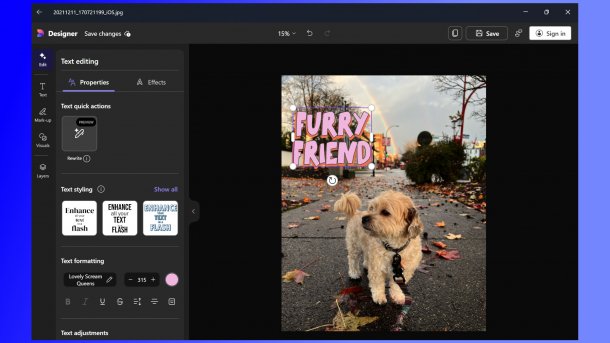
The AI editing function for adding fonts, for example, is now available in the file context menu of the file explorer.
(Image: Microsoft)
Microsoft is starting to distribute the March preview version of the Windows Photos app to Windows Insiders. The most notable new features include new shortcuts in File Explorer for AI-supported editing and a visual search that works without opening the Photos app.
Microsoft's developers describe the improvements in Windows Photos in a blog post. New entries have been added to the context menu for images in File Explorer. Behind “Photos” there is direct access to “Edit with Photos”, “Erase Objects with Photos”, “Create with Designer” and “Visual Search with Bing”. The image above shows an example from Microsoft of “Create with Designer”, which can be used to add decorative text, change the image composition with object selection or make color changes.
Photos: More AI functions
The “Erase Objects” link is used to quickly remove unwanted elements. “Visual Search with Bing” returns similar images or related products and more directly from the desktop. A new addition is the Copilot button in the Photos app. It is designed to analyze the image with AI and provide expert-level advice on how to improve the images. Image Insights are also designed to highlight interesting details of the photos. Personalized recommendations are designed to help improve your photography skills.
Videos by heise
The Windows Photos app has been receiving an OCR function (Optical Character Recognition) under Windows 10 and 11 in a gradual rollout since the end of January. It supports more than 160 languages and can be started simply by clicking the “Scan Text” button in the Photos viewer. The app marks recognized text with an overlay in which it can be selected and copied to the clipboard. The current update upgrades the “Search in Web” function, which makes it easy to search for highlighted text from within the app.
“Due to frequent requests”, Photos now also supports the JXL file format, i.e., the powerful successor JPEG XL to older compression methods such as JPEG or WebP, which promises higher compression rates without significant loss of quality. The developers have also made error corrections in the Image Creator and the restyle image function for Copilot+ PCs, which should improve quality and performance. This includes, for example, that Image Creator can now be started successfully after the initial start of the Photos app and that created images can be saved under different file names.
Not all Insiders will receive all changes immediately; Microsoft is distributing the new functions and the new build 2025.11030.20006.0 or newer in stages.

Last September, Microsoft began distributing an insider version of Photos, which offered more cloud connectivity in particular. The additional online functions included the option to integrate Apple's iCloud Photos.


(dmk)

