


Redesign of Apple Mail: Automatic categories cause confusion
From iOS 18.4 and macOS 15.4, Apple's Mail app automatically sorts all messages into categories. This means that emails can get out of sight.
(Image: Mac & i)
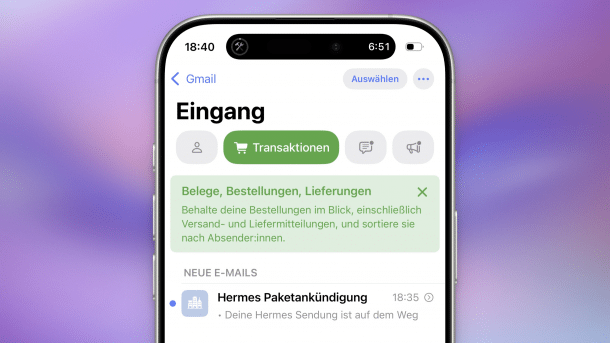
With the latest updates, Apple has redesigned the email client pre-installed on iPhones, iPads and Macs: In iOS 18.4, iPadOS 18.4 and macOS 15.4 Sequoia, Apple Mail automatically sorts all emails into four categories. As a result, emails can seem to disappear from the inbox, as some users complain. The reason is that Apple Mail assigns these messages to a different category – and they are no longer directly visible in the inbox.
Apple is trying to counteract this by pointing out the new function and explaining the new categories with integrated notifications. However, some users may easily overlook this –, especially if they are already panicking and searching for supposedly lost emails.
Deactivate categories in Apple Mail
The categorization itself is very simple: Apple Mail differentiates between "Important", in which particularly relevant emails should end up. There are also "Transactions" (such as orders and shipping messages), "News" (such as newsletters) and "Advertising". The latter does not contain spam, but intentional advertising – such as offers from online stores.
It should be noted that the categories are not suitable as a spam filter: spam and phishing emails that land in the inbox are sorted in the same way as other emails, often under "Important" and marked as "time-critical", as phishing scams in particular rely on urgency. The categories have been available on the iPhone for some time. However, since iOS 18.2, they were only available if the operating system was running in English and were only designed for English-language emails. This has now changed with iOS 18.4.
Videos by heise
If you want to see all emails again, you have to swipe from right to left across the bar with the categories – either with your finger or with the mouse/trackpad. The "All emails" category is hidden there. Alternatively, users can switch back to the classic list view at any time: This is hidden behind the button with the three dots. There you can also use the "About categories" item to see how many messages Apple Mail has sorted where.

New Apple Mail without Intelligence
The function works independently of Apple Intelligence and is therefore also available on older devices. The categorization is apparently done locally on the devices and, based on previous experience, does not seem very clever. Users can assign incorrectly sorted emails to a different category themselves, and subsequent emails should then end up there. However, this re-sorting seems to be strictly based on the respective sender address.
Empfohlener redaktioneller Inhalt
Mit Ihrer Zustimmung wird hier ein externer Preisvergleich (heise Preisvergleich) geladen.
Ich bin damit einverstanden, dass mir externe Inhalte angezeigt werden. Damit können personenbezogene Daten an Drittplattformen (heise Preisvergleich) übermittelt werden. Mehr dazu in unserer Datenschutzerklärung.


(lbe)

