


Universal admin console: Manage containers and VMs locally with XPipe 16.0
XPipe can be used to control server connections locally. Version 16 brings support for Docker Compose and KeePassXC, as well as revised SSH connections.
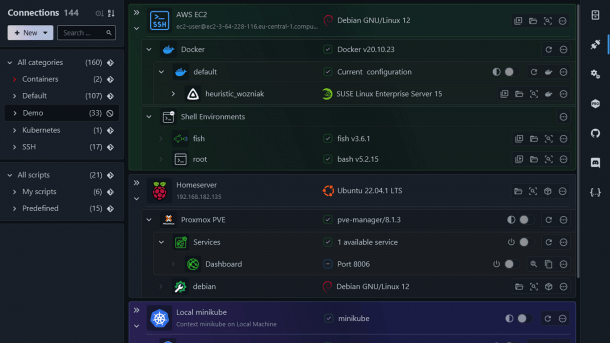
(Image: XPipe)
Version 16.0 of the open-source server administration console XPipe has been released. It can be used to manage clusters, container environments and virtual machines remotely. The tool features remote file management and allows access via various terminal emulators and a graphical user interface. New features include support for the terminal multiplexers ZelliJ, Tmux and Screen. The Windows subsystem for Linux (WSL) has also been integrated into the application as a terminal environment. Furthermore, XPipe now includes support for the password manager KeePassXC.
XPipe 16.0 supports Docker Compose
XPipe brings together all remote connections to servers in a local application and displays them in a hierarchical view. The tool includes integrations for container environments such as Kubernetes, Podman or Docker. With the update to version 16.0, XPipe now supports Docker Compose. This means that the application groups containers contained in Compose projects so that administrators can manage them together. In a revised view, XPipe now permanently displays the status of Docker containers together with the system information.


Automate basic and advanced Windows administration tasks: In this three-day hands-on workshop, system administrators will learn to write PowerShell scripts to optimize recurring tasks, manage data, create reports and configure systems efficiently. The focus is on practical tasks that are carried out under supervision in a specially equipped lab.
Registration and dates at heise.de/s/Z7ZEW
The administration console also enables access to hypervisors such as KVM, VMware and Proxmox, which was recently released in version 8.4 with new admin functions. Administrators can use a preferred shell for each connection, including Bash, Fish, and PowerShell. With the support of terminal multiplexers, the developers want to simplify the use of terminals without tabs. Under Windows, a WSL distribution, including Arch Linux, can now be used as a terminal environment for seamless integration of the terminal multiplexers. Furthermore, XPipe 16.0 now allows user-defined commands for starship, oh-my-posh and oh-my-zsh.
SSH direct connection instead of gateway
XPipe uses the Remote Desktop Protocol (RDP) and Virtual Network Computing (VNC) for desktop transfer. Alternatively, X11 forwarding via SSH tunnel is possible. For the update, the developers revised the SSH implementation in XPipe. This means that local SSH keys can now be used for gateway connections. The remote integration of Visual Studio Code also enables additional SSH connections within the development environment, including to virtual machines. For VMs, a direct SSH connection using the IP address is possible instead of using the hypervisor host as an SSH gateway.
Videos by heise
In addition to KeePassXC, XPipe also supports other password managers such as 1Password, Bitwarden and LastPass. The developers revised all password manager integrations for the update to version 16.0 so that administrators can use them without additional configurations. The tool also stores password manager requests in a cache to avoid errors when many passwords are required. In addition, there is now support for the password managers' SSH agents.
All changes to the tool published under the Apache 2.0 license can be found in the developers' blog. In addition to the free community version of XPipe, there is also the Homelab plan with an unlimited number of hypervisors for five US dollars per month. The professional version with support for companies costs ten US dollars per month. There is also an Enterprise plan with volume licenses and prioritized support. XPipe is available for x64 and ARM64 systems with macOS and Linux. There is only a x64 application for Windows.


(sfe)


