


Windows subsystem for Linux: Fedora 42 presented as official distribution
The Windows subsystem for Linux gets another official distribution with Fedora 42. It is configured for use by developers.
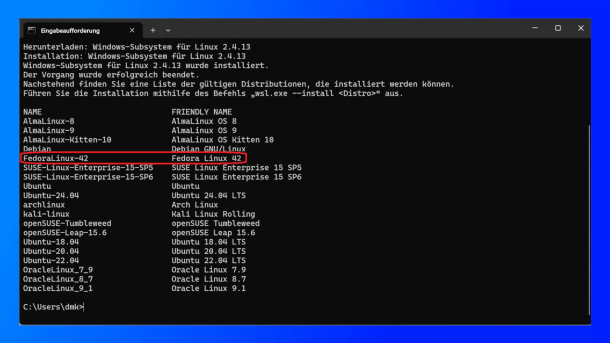
Fedora 42 is now available in the Windows Subsystem for Linux 2.
(Image: Screenshot / dmk)
Microsoft has introduced Fedora 42, another official distribution in the Windows Subsystem for Linux (WSL). However, this announcement was delayed. Fedora has already been listed in the officially available distributions for several weeks. The WSL image of Fedora differs only slightly from the cloud and container images of the distribution. However, it is designed for use by developers, so the man pages as well as wget and vim are installed by default. X11 and Wayland are also preconfigured for WSL.
Flatpak is not included by default
The command wsl.exe --install FedoraLinux-42 can be used to automatically download the Fedora 42 image from the Microsoft Store via the command prompt and install it in the WSL. The start is carried out with wsl -d FedoraLinux-42. In addition to Fedora, Microsoft also recently introduced Arch Linux as an official distribution in WSL. With the command wsl.exe --list --online, users can retrieve all available distributions and install them with wsl.exe --install <name>. Other official distributions include Debian, Ubuntu, openSUSE and SUSE Enterprise Linux.
When starting for the first time, Fedora asks for a name and automatically creates a user account without a password with sudo rights. Like other distributions based on Red Hat, software is installed in Fedora via RPM packages. It uses the package manager dnf for this purpose. Alternatively, users can install graphical applications as a flatpak, which is not part of the Fedora WSL image by default. However, it can be installed later with the command sudo dnf install flatpak. The complete software portfolio of Flathub is then available to users.
Fedora does not support Windows 10
With WSL, Linux applications can be used directly from Windows without the need for additional hardware, setting up a dual-boot system or a virtual machine. WSL is available from Windows 10 and the corresponding server versions. However, in view of the upcoming end of support for Windows 10, the Fedora developers only support Windows 11. Installation on Windows Server 2022 and 2025 is still possible. The KB5014678 update is mandatory for operation on Windows Server 2022.
Videos by heise
All information on Fedora 42 in the Windows subsystem for Linux can be found on the Microsoft developer blog and in the Fedora documentation. As in the workstation version of Fedora 42, the WSL image contains numerous developer tools, including GCC 15, LLVM 20, PHP 8.4 and Python 3.9 to 3.14 alpha.


(sfe)


