


Notepad: Preview shows text formatting and Markdown support
The rudimentary text editor Notepad gets new functions. The preview shows text formatting and support for Markdown.
(Image: Microsoft)
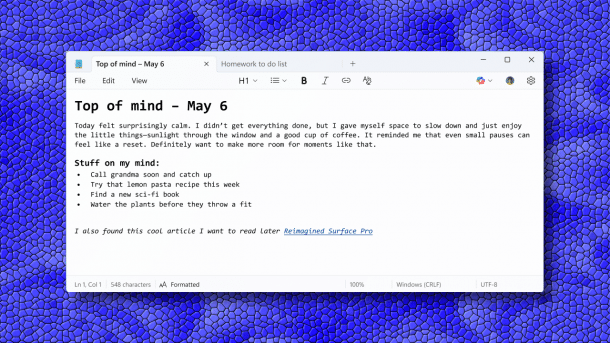
Microsoft is distributing new preview versions of the rudimentary text editor Notepad in the Insider channels. It now learns advanced text formatting and also allows Markdown-style input.
This makes Notepad a much more powerful word-processing tool. Microsoft discusses the new features in more detail in a blog post. According to this, Microsoft is distributing the preview version to Windows 11 insiders who use the “Canary” and “Dev” channels.
Notepad gets Markdown support
The most important change is the support of “Lightweight Formatting” using Markdown. This is a markup language that can be used to format elements in plain text, for example as a link or with font formatting such as boldface. The formatting bar at the top of Notepad offers buttons to apply such formatting when writing or to selected sections. Notepad currently supports bold and italics, hyperlinks, simple lists and headings.
Videos by heise
All formatting can be removed again with a single click, Microsoft explains further. This can be done with a button on the formatting bar or from the “Edit” menu. In the “View” menu, users can also switch between the formatted view or the Markdown syntax view. There is also a toggle switch in the status bar that makes this easier. For those who have no use for this and are bothered by the additional options, Microsoft has also created the option to completely deactivate formatting in the app settings.
Markdown support is included in Notepad from version 11.2504.50.0. It is currently unclear whether and when this function will be included in the generally available Notepad version.

Microsoft is constantly developing the programs and tools that come with Notepad. At the end of last year, Microsoft implanted artificial intelligence in Notepad and Paint, for example. In Notepad, it should help to reformulate sentences, change the tone of a text and adjust the length of your content.


(dmk)

