


Windows Insider previews bring new start menu
Microsoft had announced changes to the Start menu. Now the company is showing them in the latest Windows Insider builds.
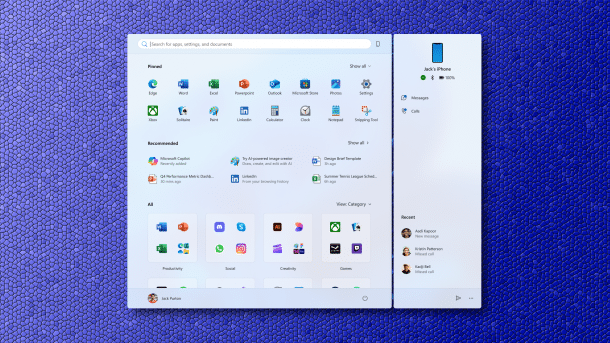
(Image: Microsoft)
The manufacturer had already announced changes to the Windows 11 start menu. Now the new features can actually be seen in Windows Insider preview versions.
On Monday, Microsoft published new Windows Insider previews for the Developer Channel and the Beta Channel. In both, the developers highlight the new Start menu in particular, which is intended to make Windows 11 easier to use.
Windows 11: Scrollable start menu
Where previously a click on "All" was necessary to access the complete app overview, the new Start menu now has a region that includes the "All" app overview – and can be scrolled through. This is also possible without having to click on a second level first.
According to Microsoft, the new standard category view groups the most frequently used categories and apps for quick access –, so the most frequently used apps are at the top of their category. Categories form the Start menu if at least three apps fall into an associated category; otherwise, Windows sorts them into the "Other" category. The grid view should be sorted alphabetically in the same way as the list view, but leave more horizontal space for the apps. In the "All" view, there are new view options where the Start menu remembers the last one selected and automatically applies it when opened.
Videos by heise
The Start menu grows with more available screen space. It is displayed larger and shows more apps and files.

(Image: Microsoft)
On large displays, the start menu will show eight columns of pinned apps, six recommendations and four columns of categories. On smaller devices, on the other hand, it shows six columns with pinned apps, four recommendations and three category columns. The start menu has been given a responsive design: If there are only a few pinned apps, the section shrinks to one row and the other sections slide higher. This behavior can be switched on and off in the settings. The same applies to recommendations, which users can also deactivate.
Also new in the Insider previews is the seamless integration of smartphones via Phone Link – "This cross-device integration is generally available for connected Android and iOS devices in most markets and will also be available in the European Economic Area later in 2025", Microsoft notes.

Other new features in the preview version of Windows include the ability to select which widgets are displayed on the lock screen. You can choose from weather, watchlist, sports, traffic information and more. There are also changes to the voice output, Windows search and the gamepad layout of the Windows touch keyboard. The updates also correct some bugs.
Some known problems remain unresolved at present, such as long waiting times on AMD- or Intel-based Copilot+ PCs after an update on first boot.
The Insider preview for Windows 11 in the dev channel raises the build number to 26200.5641, whereas the version in the beta channel is 26120.4250 after the update.


(dmk)

