


Android 16: Google upgrades the desktop mode
Google has released the desktop mode for Android for developers to test with the Android 16 QPR1 Beta 2 update – Pixel 8 or 9 required.
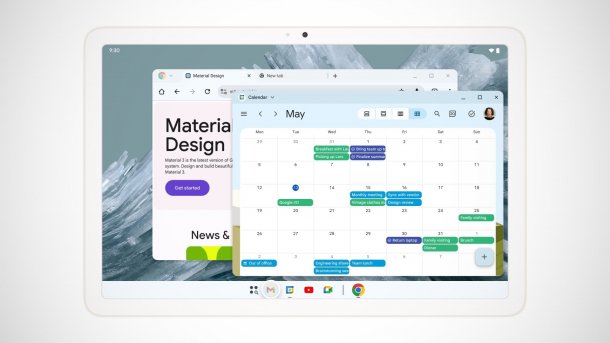
Google has released the desktop mode developed together with Samsung Dex in a first andorid 16 beta version.
(Image: Google)
In addition to the finished update to Android 16, Google has published a new version of the Quarterly Platform Release (QPR). This contains a first public version of the desktop mode, which is to be released later this year. The company also explains in a blog post what developers and interested users should know about the upcoming desktop view.
Android 16: Window mode for external screens
The company had already announced a desktop mode for Android based on Samsung's DeX at Google I/O 2025. This means that if an Android smartphone is connected to an external display in future, the smartphone screen will not simply be mirrored, but a real desktop mode will appear with a taskbar as well as app windows that can be adjusted in size and freely arranged.

(Image: Google)
As Google explains in the Android developer blog, the desktop mode is based on the desktop window function that the company introduced for tablets in September 2024. There is also no need to switch to a special mode when an external screen is connected. The Windows view will also be available on tablets.

Together with Samsung, Google wants to enable the new desktop mode specifically for devices with large screens and smartphones with connected displays in Android 16 for the entire Android ecosystem. This means that not only Pixel and Samsung devices will have access to this mode via DeX, but also Android devices from other manufacturers.
Desktop mode: there are differences
According to Google, desktop mode works differently depending on the output device: If a smartphone or foldable is connected to an external monitor via a DisplayPort, a desktop session is automatically initiated on the monitor. The output device and the external display work independently of each other, with apps running on the screen to which they have been assigned.

(Image: Google)
If a desktop-window-capable device – is connected to an external monitor like a tablet –, the second screen serves as an extension of the workspace, just like with classic notebooks. The two screens then function as one continuous system, so that app windows, content and the cursor can be moved freely between the screens. In both desktop views, there will be a taskbar with pinned and active apps, as well as freely positionable windows.
Improvements
According to Google, it has introduced further optimizations and functions in QPR1 Beta 2: For example, the mode supports multiple desktops, allowing users to create different workspaces – for productivity, entertainment and more –. You can switch between desktops using keyboard shortcuts, trackpad gestures and the overview.
Videos by heise
The new Android function can also maintain window sizes, positions and states across different desktops. This means that users can set up their preferred workspaces once, and Android will restore them the next time desktop mode is called up.
Improved compatibility with older applications is a welcome feature for developers and users alike. This should keep the effort for developers to a minimum and ensure a "flawless display of the programs". It is also possible to start multiple app instances so that they can perform different tasks on different desktops.
QPR1 Beta 2: Desktop mode must be activated
Even though Google is integrating desktop mode into an Android pre-release version for the first time, unlike other functions, it is not activated by default. Instead, testers must switch on desktop mode in developer mode and restart the device. Users must also activate the developer options before using it for the first time.
According to Google, desktop mode for Android devices is to be made available later this year, but only for compatible tablets at first. In this context, it could also be interesting to see what Google will do with ChromeOS. The company is reportedly set to restructure the operating system radically.


(afl)

