


Windows Insider Preview enables export of recall snapshots – in the EU
In Windows Insider previews in the beta and developer channel, Microsoft is testing an export function for recall snapshots in the EU.
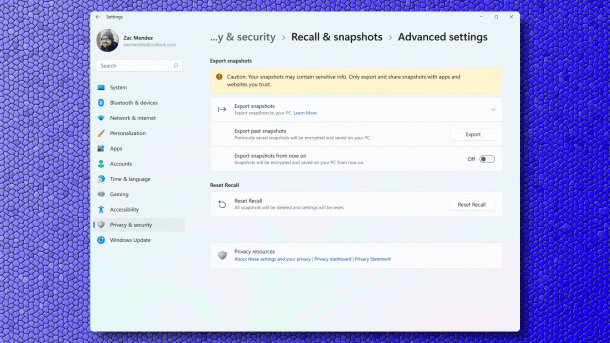
Recall users in the EU have new options.
(Image: Microsoft)
Participants in the Windows Insider Program are currently receiving preview versions that offer new options for Recall in the EU. The snapshots of screen content taken by Recall can be exported once or regularly.
Sharing the snapshots should enable further processing with third-party apps and websites, Microsoft writes in the announcement of the Insider beta version. When opening Recall for the first time and opting in to save snapshots, Recall now displays an “export code” in the EU. In the future, this will be required to export Recall snapshots and share them with trusted apps or websites.

(Image: Microsoft)
Microsoft's developers explain: “In line with industry best practice, we only display the export code once during the initial setup to ensure that you, and only you, have control over the export of your data. Microsoft does not have access to the export code and cannot recover it if it is lost.” For exported snapshots, the – function encrypts the export code and path, and interested parties must share it with third-party apps or websites so that they can gain access to it. Microsoft intends to provide documentation for developers of such apps or websites at a later date.
Further recommended actions for Recall
If the export code is lost, or it is suspected that unauthorized people have gained access to it, those affected should reset Recall. This deletes all snapshots and resets the Recall settings to the default values. Windows will also create a new Recall export code if interested parties reactivate the storage of snapshots.
Videos by heise
Microsoft also explains how the export to Recall works. To start the export function, users must authenticate themselves using Windows Hello. There are then two export options. One is to export previous snapshots, with the time periods “Past 7 days”, “Past 30 days” or “All” snapshots. To permanently feed third-party apps and websites with snapshots, there is also the option to export snapshots “from now on” – this ranges from switching on to switching off by the user or resetting Recall. Interested parties can also find separate instructions on exporting snapshots and resetting Recall at Microsoft.
For managed devices, Microsoft also provides policies that control the recall export – the “AllowRecallExport” policy is used to allow or deny the export. The default value for organizations denies the export. The export is controlled per user. Microsoft also mentions that users in the EU who install the beta or developer preview and already use Recall will experience a reset of Recall.
Further new features for Insiders
Both Insider previews also offer to display a large time with seconds in the notification center above the date and calendar again. The other smaller changes can be found in the Microsoft announcements linked above.

Last week, Microsoft primarily revised the Start menu in the Insider Previews. It is intended to simplify the operation of Windows.


(dmk)

