


When AI programs a Mac app: Developer reports on experiences
An experienced Mac developer had a complex app created almost entirely by Claude Code. He now reports on his experiences with the AI.
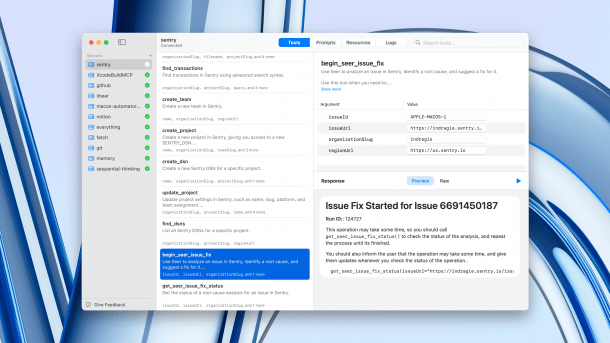
Screenshot of the almost completely AI-generated Mac app Context
(Image: Indragie Karunaratne)
Opinions are divided on the use of artificial intelligence in development: for many, AI has long been indispensable as a programming assistant in everyday life. But leaving the complete development of an app to an AI? This is still a red flag for numerous programmers. Developer Indragie Karunaratne wants to take up the cudgels for AI and has published the Mac app Context as an example of what is now possible.
Context is an app for debugging MCP servers. The Model Context Protocol (MCP) is a standard from Anthropic for the connection between AI applications and external data sources. The app was developed in Apple's Swift programming language. The user interfaces were written in SwiftUI. The source code of the app can be viewed publicly on the developer's Github account. Karunaratne works full-time as a technical director at Sentry, a platform for identifying and correcting errors in applications.

A dream for leisure projects
In a detailed blog post, the experienced macOS developer explains that the app was created almost entirely with Anthropic's Claude code. Of the 20,000 lines of code, he wrote less than 1,000 himself. The rest came from the AI-supported development environment.
Videos by heise
The developer, who has been programming software for the Mac since 2008, describes his experience as fundamentally different to previous projects. While he was previously unable to complete any side projects in his spare time for years, the AI enabled him to develop and publish a complete macOS application within a few months.
Strengths and weaknesses of the AI
Claude Code differs significantly from other AI coding tools such as GitHub Copilot, Cursor, or Windsurf. Instead of extending existing IDEs with AI functions, it completely replaces the traditional development environment with a terminal-based interface. The focus is on an “agentic” approach.
Through the development of context, he also became aware of the strengths and weaknesses of AI. Claude Code had a good command of Swift features up to version 5.5 but had difficulties with Swift Concurrency, which was introduced from Swift 5.5 onwards. The system often falls back on outdated Objective-C APIs instead of using modern Swift alternatives.
However, Claude Code has shown its better side with SwiftUI: The generated user interfaces worked reliably, even if they didn't look very appealing at first. It is remarkable that the design could be significantly improved with simple instructions such as “Make it more beautiful,” as Karunaratne writes.
Preparation is everything
Another insight from the project was that “prompt engineering” is no longer a major challenge today, as modern models understand even incomplete and poorly formulated queries quite well. Context engineering, on the other hand, was the key to success. The limit of 200,000 tokens in the latest Anthropic models was a challenge.
The “priming” of the agent is crucial: Before Claude Code takes on a task, it should read relevant documentation and source code. First, the developer has the system analyze existing code and study specifications before it begins implementation.
Despite all the AI support, precise specifications are essential. The developer warns against marketing demos that claim to be able to create complete apps with a single sentence. Detailed descriptions of the desired functionality are still necessary for production-ready software. Another tip: Claude Code should first create a plan with “Ultrathink” before starting the implementation. This instruction activates an extended thought process that delivers better quality results.
Set up feedback loops
Claude Code becomes particularly effective through well-established feedback loops. The system should be able to compile, test, and correct errors independently. The developer used additional tools such as XcodeBuildMCP to make it easier for Claude Code to create macOS apps. For troubleshooting, screenshots can be inserted directly into Claude Code. The system then analyzes visual problems and suggests corrections.
Finally, Claude Code created a 2,000-line Python script that automated the release process, automatically signing the code, notarizing it, creating DMG files, and distributing updates.
Big changes ahead?
The developer predicts a major change in the development environment. Traditional features such as file trees or source code editors in development tools could become less important. Instead, IDEs will focus on helping developers to prime AI agents and set up feedback loops. Traditional programming could become a secondary activity.


(mki)

