


MIDI keyboard with DX7 emulation: M-VAVE SMK-37 Pro tested
With the SMK-37 Pro, M-VAVE offers an affordable MIDI keyboard that impresses with its many functions. We have tried it out.
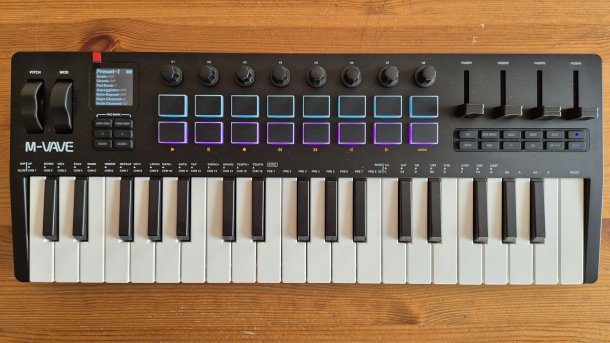
M-VAVE SMK-37 Pro
(Image: heise medien)
Almost every well-known manufacturer has MIDI keyboards for controlling a digital audio workstation (DAW) and software synthesizers in its range. To stand out from the crowd, M-VAVE recently launched the SMK-37 Pro. With a street price of around 70 euros, it is downright cheap. It also scores points with a sprawling list of functions. On top of this, the developers have packed a DX7 emulation that can use the thousands of freely available patches for Yamaha's classic FM synthesizer.
A keyboard like this can then not only control a DAW or other instruments, but is itself a fully-fledged synthesizer. After connecting headphones, interested parties can try out melodies or record patterns in the integrated sequencer. It can handle 64 steps and save eight patterns – which is significantly more than many devices can do.
Lots of buttons, knobs and sliders
The 37 mini-keys are velocity-sensitive. M-VAVE has even equipped the 18 RGB-backlit pads with aftertouch. In addition to a pitch and mod wheel, there are also eight endless rotary knobs on board. Finally, the device also has four faders – which, in contrast to the rotary knobs, are somewhat wobbly to the touch. There is a button for each fader and knob that switches to a second bank, allowing you to control even more DAW parameters.
The 1.54 inch (approx. 39 mm) display shows adjustable parameters with the rotary knobs. When playing notes, it also shows the note being played and, if several keys are pressed simultaneously, even which chord is being played. This is certainly useful for beginners.
However, the operation is somewhat awkward. The arpeggiator is activated by tapping the "Arp" button. If you press and hold the button, the parameters that can be modified with the buttons appear on the display, such as tempo, direction, use of additional octaves and similar. However, the arpeggiator is currently faulty, "Random" only plays the notes in the upward direction.
The keyboard contains a 2000 mAh battery, which allows it to be used without an external power source, for example with headphones when on the move. Thanks to the built-in sequencer, melodies can also be easily saved on the move.
Videos by heise
Integrated FM synthesizer
The included synthesizer is activated by tapping the "Patches" button. There are four pre-assigned banks with 32 patches each, which can be accessed via the rotary controls one to four. To change the patch, press the "Patches" button and turn the rotary control of the desired bank. After releasing the "Patches" button, the selection is active. This is unnecessarily cumbersome.
The patches can be uploaded with MIDI sysex; this also works from websites with FM patch collections and MIDI upload function. This means that more modern or custom patches can be easily transferred to the device and used, for example a whole bank of drum patches. The parameters of the patches can be changed to a limited extent, but the SMK-37 Pro does not offer full or even intuitive control over the values of the 6-operator FM patches – the numerous rotary controls would actually be ideal for this.
An FX section offers distortion, reverb and delay. However, the quality is very basic.
Complicated MIDI setup
The SMK-37 Pro establishes the MIDI connection either wirelessly via USB-C or via the integrated Bluetooth MIDI interface. For Windows, M-VAVE provides the "Sinco Connector" on the website. The MIDI suite for macOS and Windows on the download page allows you to adjust some default settings. The "M-upgrade" software is used for firmware updates. The manufacturer has already released two newer firmware versions since the first one, which eliminate some problems such as pop and click noises shortly after patch changes.
To use the SMK-37 Pro in a DAW such as Studio One via USB-C, an external device of the type "Instrument" must be created and the ports "MIDIIN3" and "MIDIOUT2" of the device must be selected. In addition, there is another external device "Keyboard" that uses the SMK-37-Pro port, which is only called "Midi", for input and output. The Bluetooth connection is much easier.
The developers have also equipped the device with an audio interface. It registers as a microphone in Windows Audio. However, due to insufficient USB descriptors, it does not appear as an audio interface in the DAW. This is where the free ASIO4ALL driver helps to use the interface. It delivers the audio stream at 24 bit and 44.1 kHz via the USB-C cable. The signal is mono.
The lack of a MIDI DIN socket is somewhat disappointing for a MIDI keyboard; only a TRS-A 3.5 mm jack connection is provided. An adapter cable is not included with the device. There is also a 6.3 mm jack connection for a sustain pedal and a 3.5 mm jack connection for headphones or as an audio output for external mixers or audio interfaces. And of course the USB-C port.
Lots of features, but limited usability
All the functions sound great. The awkward operation often spoils the enjoyment of the device. However, what is currently most annoying is the lag or delay that the keyboard delivers in synthesizer mode. You can create a complete song in the DAW with it, but the timing of the individual tracks is a bit off – for professional use.
Until a future firmware update provides corrections here, the built-in synthesizer of the M-VAVE SMK-37 Pro is only useful for sketchy strumming on the sofa, for example. If you want to use the device as a synthesizer for music production, you'll have to hope that M-VAVE will get the shortcomings under control with updates.
The Akai Mini Play mk3 is a direct competitor. Its buttons are larger and easier to operate. The drum pads can also be used directly for finger drumming, for example, as several built-in drum samples are mapped to them, whereas with the SMK-37 Pro only one patch is addressed with the pads in synth mode.


(dmk)


