


Powertoys 0.94 with settings and keyboard shortcut conflict detection
Version 0.94 of Powertoys includes features for searching for settings and keyboard shortcut conflicts.
(Image: heise medien)
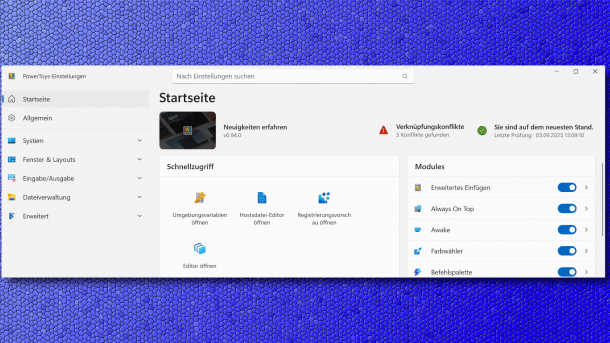
Microsoft has released version 0.94 of the Powertoys for Windows. This time, they bring useful new functions, such as the fuzzy search for settings or the reporting of overlapping shortcuts for calling up functions from the tool collection.
The developers announce the Powertoys release in a new blog post. The updated version should make it easier to find the settings you are looking for, detect conflicts in keyboard shortcuts, or help you move the mouse cursor in a new way. The search function for settings is now located at the top center of the user interface. The search supports "fuzzy matching", i.e., a fuzzy search in which you do not have to specify the exact name of a setting. This serves precisely the purpose of making it easier to find settings in the now somewhat confusing number of options. In addition to clicking in the search box, the shortcut keys "Ctrl" and "F" also work, as in all apps.

(Image: heise medien)
As Powertoys includes so many functions, almost all of which can be called up using keyboard shortcuts, conflicts are inevitable. As of version 0.94, Powertoys can display precisely such conflicts as a new function so that users can change the corresponding key combinations and call up the desired functions.
Videos by heise
Moving cursor
Under "Input/Output" and then "Mouse utilities", the "Mouse pointer 'crosshairs'" option now includes the "Floating cursor" function. By default, the combination of the Windows and Alt keys together with "." activates the function, which switches through in several steps. The first step moves the crosshairs quickly horizontally, the second then slowly. The third time the key combination is pressed, the crosshairs move vertically, quickly from top to bottom, and the fourth step leads to a slow movement. This is intended to help those who find it difficult to aim with the mouse – a bar-free function.
The project lists further changes in the release notes for version Powertoys 0.94.
The update can be initiated with the integrated update search. As usual, the installation packages are also available for download:
- Powertoys 0.94 (machine-wide installation, x64)
- Powertoys 0.94 (machine-wide installation, ARM64)
- Powertoys 0.94 (user installation, x64)
- Powertoys 0.94 (user installation, ARM64)
In mid-August, the programmers released version 0.93 of Powertoys. In the six weeks of development time since the previous version, they have modernized the user interface and made it clearer, as well as correcting around 100 problems with the "Command Palette" function.


(dmk)


