


Material 3 Expressive: A look at Google's new design for Pixel
Google released major design update for its Pixel models from the 6th generation onwards at the start of September. What will change with Material 3 Expressive?
Android 16: Among other things, users can personalize the lock screen more under Material 3 Epressive.
(Image: Andreas Floemer / heise medien)
Material 3 Expressive (M3E), which was announced at the I/O developer conference in May, has arrived. Google first delivered it with the Pixel 10 series, and since September 3, owners of a Pixel 6 and newer have been able to install it on their devices with the release of Android 16 QPR1 (aka Pixel Drop). Many things are (optionally) more colorful, bolder, and have more prominent font elements. But something has also changed in terms of operation.
We take a second look at the now mostly finished user interface, which is accompanied by the first, partly customized apps.
Colorful on request
As Google said in May, Material 3 Expressive is the company's “most extensively researched design language, designed to appeal to the broadest range of users across generations.” Google could be right about this, because even if it appears to be very “colorful” and brightly colored at first glance, it offers extensive customization options. This means that users who prefer subtle colors or even a completely colorless appearance will also get their money's worth.

(Image: Andreas Floemer / heise medien)
Visual changes are not initially noticeable when looking at the home screen unless you look at details such as the battery indicator, network icons, and the clock, which Google has redesigned. The change in the quick settings is more significant, as the width of the individual buttons can be adjusted, providing more space for buttons in one view. However, some buttons, such as Bluetooth, should be left at their normal width, as they have two functions: if you tap on the left side of the button, Bluetooth can be deactivated, while a tap on the right side takes you to the other settings.

(Image: Andreas Floemer / heise medien)
The brightness slider in the quick settings also has a new shape, which is now less rounded and has a narrow horizontal bar as an indicator. The same design change can also be found in the volume and media controls, which can be accessed via the volume bar.

(Image: Andreas Floemer / heise medien)
In the overview of recently opened apps, which can be found either via the Recents button (on the right in the button navigation) or via the corresponding swipe gesture, each app has been given a drop-down menu in which an individual app can be removed. You can also access the respective app settings from here to view and manage permissions, for example.

The app overview has been redesigned and can now be dragged onto the home screen like an additional layer. As with the quick settings, color nuances of the screen background always shimmer through in the app overview, which creates a certain lightness compared to the monochrome and non-transparent backgrounds used previously.

(Image: Andreas Foemer / heise medien)
Apart from the look, Material 3 Expressive also introduces a new feel: when swiping away a notification from the notification overview or a mail in the Gmail app, the device now vibrates on demand. The new animations when hiding a notification, in which the adjacent notifications react to the interaction, are also nice to look at and give a more dynamic feel when using the device.
New tricks for the lock screen
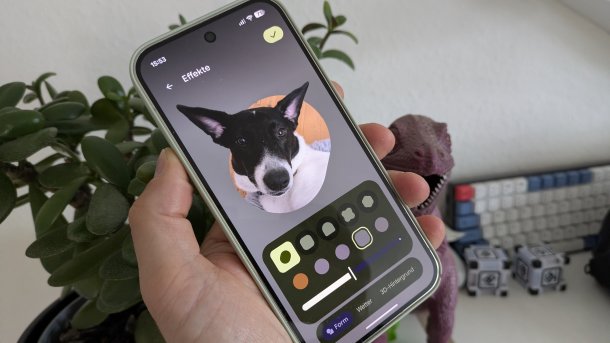
With Material3 Expressive, Google is giving the lock screen new effects: firstly, users can use their image, which they can customize with different frame shapes and different background colors. While this did not work without errors in the beta version, it is easier to use in the final release. Unfortunately, the selection of background colors is a shade too limited.

(Image: Andreas Floemer / heise medien)
On the other hand, it is possible to conjure up weather conditions such as sun, rain, or snow on the lock screen—even the local weather can be discreetly displayed there. If you like, you can also add a 3D effect to your image to make it appear more three-dimensional. The effect can also be displayed on the home screen.
Piecework: Material 3 Expressive in apps
Material 3 Expressive not only permeates Android 16 (QPR1), but also ends up in portions of applications—above all, of course, in Google's own apps. The company does not appear to be implementing the new design in full all at once, but rather in phases. The first M3E elements can be found in Gmail, Chrome, and Wallet, and Google has already touched the “Find my device” app and Files.

(Image: Google)
Meanwhile, Google has extensively redesigned the phone app and provided it with an iOS-like call screen. In the course of this, Google has reduced the size of the overview of your favorites and moved it to a carousel, which is hardly comprehensible – the previous view was clearer. Meanwhile, the screenshots app and the new diary app have been completely adapted to the new look.
Other developers are also likely to gradually adopt the new design, although this is still limited at present. Only the wallpaper app Backdrops has already been redesigned to some extent.
The apps adapted to M3E are not only used on smartphones with Android 16 but on all Android versions. The new look will also be used on Wear OS devices such as the Pixel Watch. Google has also already made progress here and revised the first applications.
Videos by heise
QPR1 is not the end of the story
All in all, Google still has a lot of fine-tuning to do, especially at app level. However, the next beta version of Android 16, called QPR2, which will be released in December as Pixel Drop, shows that Google will automatically provide a theme-related icon for apps if developers have not stored one for Android's dynamic theme.

(Image: Andreas Floemer / heise medien)
According to Google, the system then applies a color filter algorithm to the existing app icon “to display it in a monochrome style so that it can be integrated into the theme chosen by the user.” Another new feature is that the user interface of the app remains fully interactive when the system share sheet is open. Even major developers such as Microsoft, Netflix, or Amazon do not offer apps for Outlook or Amazon Prime Video that have been adapted accordingly. Users can also use QPR2 to force dark mode in apps, even if developers have not integrated one.
As with Google's Material You from 2021, Google is also likely to make the new Material 3 Expressive available to other manufacturers so that they can at least partially adopt it for their user interfaces. Motorola's user interface for its smartphones remains very close to Google's design, while other manufacturers such as Samsung and Oneplus tend to only adopt elements such as dynamic theming. However, they have no choice when it comes to apps with Material 3 Expressive.


(afl)

