


MX Master 4: Logitech's classic mouse gets a vibration motor
The MX Master 4 gets new functions. However, Logitech does not rectify points of criticism such as the low polling rate.
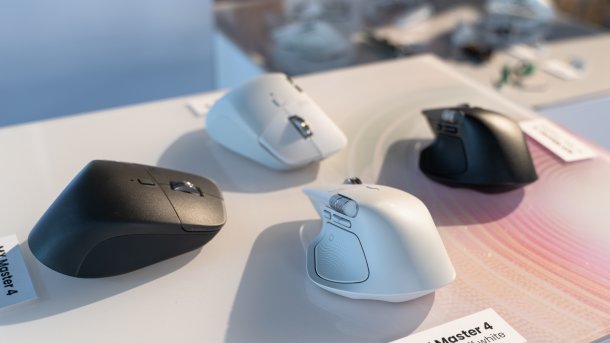
(Image: Mark Mantel / heise medien)
Logitech presents the fifth iteration of its well-known office mouse: the MX Master 4 comes three years after the MX Master 3S and six years after the original 3 version. Amazon added the mouse to its shop prematurely a month ago; now Logitech is sharing all the specifications and also naming the official price of 130 Euros.
Haptic feedback thanks to vibrations
The focus is on a vibration motor that enables haptic feedback. It is coupled to the side part on the thumb, which continues to function as a large button. Users can set the motor to simply vibrate each time a button is pressed, which means the click no longer feels spongy.

(Image: Mark Mantel / heise medien)
Logitech also provides a devkit (SDK) that software developers can use to incorporate haptic feedback into their applications. Adobe is the first (and so far only) partner: Whenever a guideline pops up in Photoshop or Lightroom and you align image elements to it, the mouse vibrates briefly.
In the driver interface, users can switch the intensity of the vibrations on or off completely. They can also determine what happens when the side split button is pressed. By default, a wheel opens with several shortcuts, including one to open AI assistants.
With more efficient wireless technology and a new 650 mAh battery, the MX Master 4 should last as long as the MX Master 3S. Logitech claims 70 days with standard settings and normal use. In an emergency, a few minutes of charging via USB-C cable should be enough for several hours of use.
Videos by heise
Still heavy and with 125 Hertz
However, the vibration motor is the primary factor that increases the weight of the MX Master 4, from 141 to 150 grams compared to the MX Master 3S – both models are among the heaviest mice. The more user-friendly design is also likely to cost a few grams: the housing is not glued; instead, it can be opened using screws on the underside.
Meanwhile, Logitech sees no need for improvement in one frequently mentioned point of criticism. The MX Master 4 also only has a polling rate of 125 Hertz, even with the latest USB-C dongle. If you are using a monitor with 144 Hertz or more, for example, the mouse will not even display current position data with every refresh. 500 or 1000 Hertz would have been desirable. The optical sensor remains at a maximum of 8000 dpi.
When asked, a Logitech designer explained that the company does not envisage a faster polling rate for the target group. The MX Master mice are intended for the office and for creative professionals.
However, Logitech has improved the surface. The coating is now rougher and has a better grip in both the dark and light colors. This is particularly important considering the weight of the mouse.

(Image: Mark Mantel / heise medien)
Cheaper MX Master 3S remains on the market
Logitech is continuing to offer the MX Master 3S alongside the MX Master 4. If you don't need the improvements of the newcomer, you can continue to use the cheaper predecessor model.
Alternatively, Keychron has a significantly lighter 50-gram replica in its range, the M6. It uses a more modern sensor, the Pixart PAW 3395, and has a polling rate of 1000 Hertz in the standard version.
Empfohlener redaktioneller Inhalt
Mit Ihrer Zustimmung wird hier ein externer Preisvergleich (heise Preisvergleich) geladen.
Ich bin damit einverstanden, dass mir externe Inhalte angezeigt werden. Damit können personenbezogene Daten an Drittplattformen (heise Preisvergleich) übermittelt werden. Mehr dazu in unserer Datenschutzerklärung.


(mma)


