


Windows: Insider previews install setup with local account
Microsoft is building the local account setup into the latest Windows Insider previews. But there are also new functions.
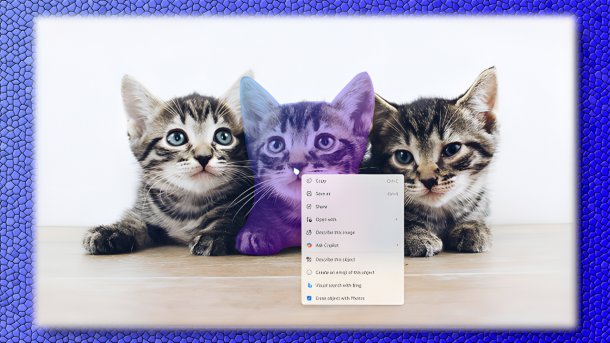
Click-to-Do gets an AI object selection for images.
(Image: Microsoft)
Microsoft has published fresh Windows preview versions in the Insider channels. In it, the company removes familiar ways of creating a local account in the “Windows Setup Experience” (OOBE, Out-of-the-box-experience). But there are also new functions. Click-to-Do on Copilot+ PCs gets object recognition and selection for images. The biometric log-in in Windows Hello gets support for external fingerprint scanners for the “Enhanced Sign-in Security” mode. Microsoft is also simplifying the input of dashes in the Canary preview.

(Image: heise medien)
In the Windows Insider preview for the beta channel and the preview for the developer channel, Microsoft points out that the developers are “removing known mechanisms for creating a local account in the Windows Setup Experience (OOBE). While these mechanisms were often used to bypass creating a Microsoft account, they unintentionally skipped critical setup dialogues, causing users to exit OOBE with a machine that may not be fully configured for use. Users must now complete the OOBE with an internet connection and a Microsoft account to ensure the device is set up correctly.”
Microsoft is making it much more difficult for users to use Windows without a Microsoft account. The company has done this time and again in the past, and the possible workarounds have probably been exhausted.
Cute kittens
Microsoft is announcing a click-to-do AI function for intelligent object selection in images, with a cute cat picture as an example. This could potentially make you almost forget such “little things” as the online account requirement. When hovering over an image with the mouse, Click-to-Do highlights areas that can be selected and then copied and pasted into other apps or used to initiate a copilot chat for deeper insights or creative actions.
Videos by heise
Biometric log-in using Windows Hello has an “Enhanced Sign-in Security” mode, which is intended to provide greater security with certain supported hardware integrated into devices. The Insider Previews now include the extension for Windows 11 PCs, including desktops and Copilot+ PCs, which enables this mode with supported external ESS fingerprint readers. Interested parties simply need to plug in these fingerprint readers and then activate them in the settings under “Accounts” and then “Login options.”
The file explorer now has more comprehensive support for dark mode. Dialogues for copying, moving, and deleting, the progress indicators, and dialogues for confirmation or error messages are now also available in dark mode and no longer stand out “blindingly” against the dark background. Both insider versions also correct minor errors, which interested parties can find in the release announcements.
On the developer front
There is also a new preview version of Windows 11 on the “developer front” in the Canary channel, where Microsoft is the first to try out new ideas. However, the changes are smaller. The displays for hardware settings such as current volume or screen brightness can now be positioned elsewhere on the screen. In addition to the current position at the bottom center, there is now a choice of top left or top center.
More exciting for frequent typists, however, is the option to insert a short dash using the Windows key and “-” key combination; Windows key, Shift, and “-” provide a longer dash. This is a blessing for those who otherwise have to use the combination “Alt” and “0150” on the numeric keypad – which is sometimes not available on laptops or mini keyboards –. The preferred apps can now be pinned in the share dialogue. The developers have also corrected some minor bugs in the Canary Insider previews, which they list in the announcement.
In August, the Windows Insider previews brought an interesting extension to the snipping tool. It can now record window videos.


(dmk)


