


Powertoys 0.97: New mouse tool for cursor "scrolling"
In version 0.97, Powertoys introduces a new mouse tool that breaks down monitor boundaries. The command palette has been improved.
(Image: heise medien)
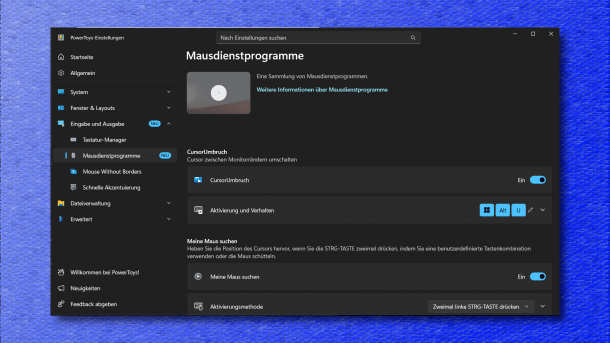
The powerful open-source tool collection Powertoys has been released in version 0.97. It brings a new function for mouse control of the cursor. It also significantly improves the command palette.
In the release announcement, the PowerToys developers provide an overview of the new features and fixes. The programmers consider the further development of the command palette to be particularly important. The user interface can now be customized to individual preferences in its settings menu under “Personalization.” This includes, for example, setting the dark mode, customizing the background with an image, or the module's behavior when the back or escape key is pressed. The fallback options for the commands to be displayed can also be adjusted with the settings behind the three-dot icon under “Manage fallback order.” The command palette can now also be used to control PowerToys modules directly.
New Function in Powertoys
The “Cursor Wrap” has been added as a new function among the mouse utilities. When activated, it ensures that the mouse does not stop at monitor boundaries but scrolls back in on the other side. This is useful, for example, when using multiple monitors and you don't want to push the mouse across two or more displays – this now allows for a shortcut. The developers have separated the quick access from the main setting process, allowing it to start faster, for example, with a simple right-click on the PowerToys tray icon. Many other small changes can be found by interested parties in the release announcement.
Videos by heise
The integrated update mechanism finds the new version on mouse click and also offers its installation immediately. For existing installations, this is likely to be the easiest way to get the new version.

(Image: heise medien)
However, updated installation packages are also available:
- Powertoys 0.97 (User Installation, x64)
- Powertoys 0.97 (User Installation, ARM64)
- Powertoys 0.97 (System-wide Installation, x64)
- Powertoys 0.97 (System-wide Installation, ARM64)
Most recently, Microsoft released version 0.96 of PowerToys at the end of November and provided it with a hotfix to version 0.96.1 just a few days later. That version had added the ability to transform clipboard contents with third-party AIs to the extended paste function.


(dmk)


