


Google Chrome gets three useful productivity features
Google announces three new features for Chrome that were introduced some time ago and should be widely available with Chrome 145.
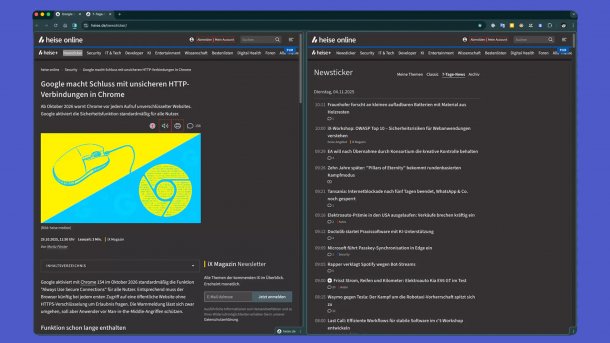
This is what the split tab view looks like.
(Image: heise medien)
Chrome becomes more helpful with three new features: Split tab view, PDF annotations, and the ability to save PDFs directly to Google Drive.
Google calls the first feature ‘Split View’. It allows two web pages to be displayed side-by-side in a single tab. This is intended to reduce constant switching between two windows or tabs and to facilitate multitasking.
There are two ways to use this feature: Either you drag a tab to the left or right edge of the browser window and release it there, or you right-click a link and select the corresponding Split View option from the context menu. A slider in the middle allows you to adjust the sizes of the two views. Further options are available via a pinnable icon in the address bar.
Chrome is not the first browser with a split tab view. Microsoft Edge and Opera also support this feature. The latter allows up to four web pages to be displayed simultaneously in one tab. Vivaldi also recently introduced a similar feature.
Edit PDFs and save directly to Google Drive
The second feature allows PDFs to be edited directly in the browser: Users can highlight text via the corresponding icon and insert annotations with the mouse, without going through another program. Digital signatures can also be created with it.
Videos by heise
Finally, Google is introducing the ability to save PDFs directly to Google Drive so they are not lost later. The files are saved in the ‘Saved from Chrome’ folder and are therefore accessible on other devices.
Chrome has recently made headlines for security issues. For example, Google had to release an emergency update to close a vulnerability that was already being actively exploited, through which attackers could execute malicious code. In addition, researchers discovered hundreds of partly popular extensions that transmitted browser history to manufacturers, as well as a campaign with fake AI add-ons that accessed data from around 260,000 users.
You can find tips on how to configure the browser more privacy-friendly and protect it from tracking in our new guide.



(mack)

