


Windows Insider Previews: More secure batch files and rotation in Paint
Microsoft has released new Windows Insider Previews. Batch files are to become more secure and Paint learns rotations.
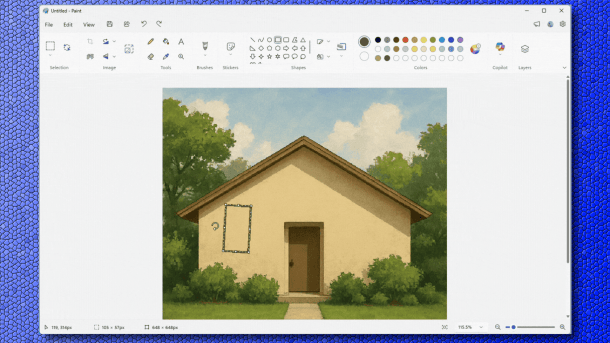
Paint now learns to rotate selections.
(Image: Microsoft / heise medien)
In the current Windows Insider Preview builds, Microsoft is adding security measures for batch files. Additionally, shared Bluetooth audio gets more setting options, and Paint learns to rotate selected areas.
The new preview builds are available on the Beta (Build 26220.7934) and Developer (Build 26300.7939) Insider channels. They introduce a new security mechanism: “Lock Batch Files”. This allows admins and creators of “Application Control for Business” rules additional control options when processing .bat and .cmd script files. These can generally be manipulated during execution, meaning that with code integrity (CI) enabled, each line must be checked before execution. This significantly slows down execution speed.
If admins enable the DWORD “LockBatchFilesWhenInUse” in the registry key “HKEY_LOCAL_MACHINE\Software\Microsoft\Command Processor” – allowed values are 0 (disabled) or 1 (enabled) –, Windows locks batch files against write access during execution. Batch signatures only need to be checked once at startup, not every single time a command is launched. The feature can also be used in manifest files for apps.
Shared Bluetooth Audio
Microsoft already expanded Bluetooth audio with “Shared Audio” in earlier Insider builds from November 2025. With supported Bluetooth LE headphones, two people can share the sound output. What's new is a separate volume control for each connected Bluetooth headphone, rather than just a shared one. A symbol in the taskbar indicates that sound output sharing is active. The feature now also supports additional devices, namely the new Samsung Galaxy Buds 4 and Galaxy Buds 4 Pro, Sony's flagship in-ear buds WF-1000XM6, and the Xbox Wireless Headset.
Furthermore, Paint is included in the new version 11.2601.391.0. The developers are particularly proud of the freeform rotation, which they have added as a frequently requested feature. Shapes, text, or any active selection can now be rotated at any angle. A “Rotate” symbol appears above a selected object. This allows the selection to be rotated freely. However, those who want more targeted control can select custom rotation from the “Rotate” menu and specify a particular angle.
Videos by heise
Microsoft is also providing an updated Insider version in the Canary Insider channel (Build 28020.1673). Essentially, the innovations that Microsoft is currently testing in the generally available update preview for Microsoft's Patch Tuesday next week will be incorporated there.


(dmk)


