


Raspberry Pi OS 6.2: Update promises more security
The Raspberry Pi developers have improved security in Raspberry Pi OS 6.2. They are disabling passwordless sudo.
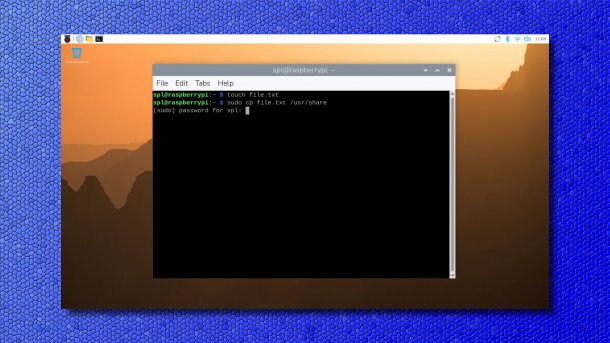
Raspberry Pi OS disables passwordless sudo.
(Image: raspberrypi.com / heise medien)
On Tuesday of this week, the Raspberry Pi project released Raspberry Pi OS 6.2, based on Debian Trixie – the second update since the jump to the current Debian. The maintainers are calling it a security update.
In a blog post, developer Simon Long explains that in addition to the collection of all the small changes and bug fixes from recent months, one change in particular stands out: In version 6.2 of the operating system, they have now disabled passwordless sudo by default.
Insecure Privilege Escalation
Against the backdrop of constantly growing cybercrime, the developers have therefore also kept the security of Raspberry Pi OS in mind, so that it is sufficiently stable to withstand potential attacks. The balance is difficult, as anything that makes the operating system more secure confronts legitimate users with inconvenience. Therefore, the maintainers want to reduce such changes to a minimum. They assume that many users will not even notice this security update.
Previously, Raspberry Pi OS was configured by default so that regular user accounts could use sudo for tasks with root privileges without entering a password. sudo apt update updates the package database of the apt software management without further prompts. However, this poses a risk: not only regular users can use it this way, but also intruders into the system.
Therefore, Raspberry Pi OS from version 6.2 onwards disables passwordless sudo. To perform administrative tasks, the password must now be entered. As long as the password has been entered, it remains valid for five minutes. Within this time, the account can perform further admin tasks without re-authenticating.
Those who do not want to adopt this change and the associated security gain can deactivate the “Admin Password” setting in the “System” tab of the Control Centre. This way, Raspberry Pi OS will not ask for the password before starting sudo commands, neither in the terminal nor in the desktop environment.
Videos by heise
Long mentions one small limitation at the end: Existing installations will not be automatically switched after an update. Here, interested parties must take action themselves to activate the sudo password prompt.
The release notes list the smaller changes and fixes that have been incorporated into Raspberry Pi OS since the last release in December. That was a minor update that appeared about ten days after the last major release in November 2025.


(dmk)


