


Android Canary: Google tests revised context menu for app icons
In the current Android Canary version, Google is testing a more compact, two-part context menu for app icons and a new notification display.
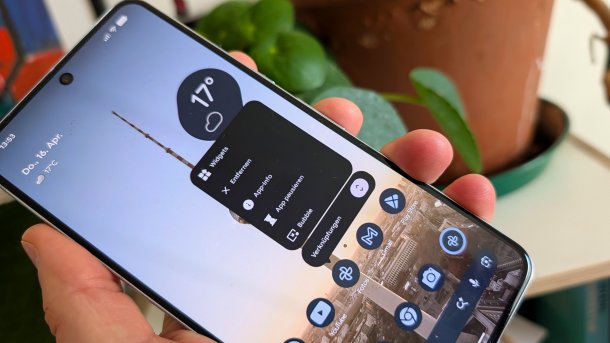
Google is testing an extended context menu in the April version of Android Canary.
(Image: Andreas Floemer / heise medien)
Google releases a new version of Android Canary once a month. This is a highly experimental Android build primarily aimed at developers and hardcore fans, and has replaced developer previews since July 2025. The new April version superficially only contains one major change, which enhances the context menu for app icons – and another tiny change. Canary features do not necessarily make their way into final versions.
More functions for the context menu
The new Canary version 2604 with build number ZP11.260320.007 is initially available for the Pixel 8 and newer for testing, but is not suitable for everyday use. Later, the Canary release is also to be provided for older models such as the Pixel 6 and others, writes Google. The experimental operating system shows what Google is working on, or rather what the company wants to show.
Much of this – especially AI functions – the company only reveals when it is largely complete. Google has confirmed that Android 17 and future versions are to get more agentic capabilities. The head of the Android ecosystem said: “We are moving away from an operating system towards an intelligent system, a platform that truly understands you and works for you.”
Videos by heise
In the Canary version, Google is baking smaller buns: it contains a revised context menu for apps, which can be opened by long-pressing an app icon. The menu is, on the one hand, more compact and, on the other hand, divided into two parts. After opening, the menu first shows quick access options, and another button opens an overview of actions. The app-lock function tested in the March version, which allows individual apps to be locked, has disappeared in this version.

(Image: Andreas Floemer / heise medien)
Another small change is the display after removing all notifications: it now says “You are up to date” accompanied by a trophy instead of “No notifications”. The new display is based on Wear OS 6, for example on the Pixel Watch, so it appears more consistent across the ecosystem.

(Image: Andreas Floemer/ heise medien)
Elements from Canary already in Android 17 Beta
Whether the new context menu will be part of Android 17 is still open. However, some features that Google had only tested in the March in the Canary channel shortly thereafter flowed into the beta version of the major update. These include app bubbles, for example, to give Android a new multitasking option. In addition, since Beta 3 of Android 17, Wi-Fi and mobile reception are separated again. In 2021, Google integrated a single “Internet” tile for both connectivity options into the quick settings with Android 12, making it more cumbersome to switch off one of the two functions.

Anyone who installs the Canary version on a device should be aware that returning to the stable version is not particularly easy. To stop receiving Canary OTA updates, you need to flash a non-Canary build, which involves a complete deletion of all data. For this, Google offers its Android Flash Tool.


(afl)

