


Microsoft's AI assistant Recall is a security risk
Recall, the new AI memory aid on Microsoft's new Copilot+ PCS, is not only practical, but apparently also a security risk.
(Image: Microsoft)
Since its announcement at this year's Microsoft Build, a function called Recall has been causing a stir. However, the feature apparently poses a security risk.
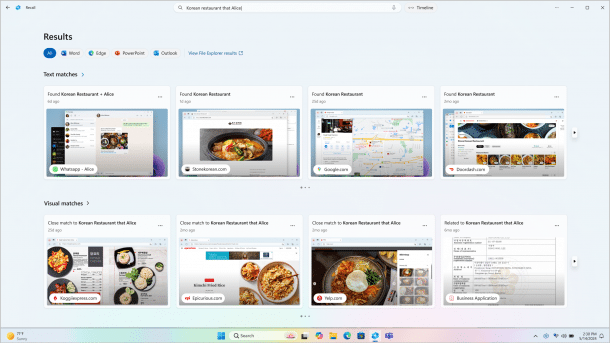
Recall takes a screenshot of the screen every five seconds if the content changes, indexes the content and is intended to serve as a memory aid for users: Thanks to AI-supported text and image recognition, it should also provide suitable results for fuzzy search queries and thus help users to remember things – similar to the MacOS software Rewind.ai.
Because the underlying Azure AI code is executed on the devices, Recall works locally, runs without an internet connection and without a Microsoft account. As long as Bitlocker is activated or the user is logged in to the PC with a Microsoft account, the entire drive is generally encrypted at rest. This also applies to the Recall snapshots. Recall uses optical character recognition (OCR) to capture the information on the screen. The contents of the windows displayed are then written to a locally stored SQLite database together with records of user interactions. Recall stores the screenshots sorted by application. According to Ars Technica, there is enough space on a PC with 256 GB of storage space to document PC usage for a whole three months.
Function problematic in several respects
One problem is that Recall is activated by default on the devices and documents all activities, even those that you explicitly do not want to be recorded or no longer want to be recorded, such as website visits in incognito mode or deleted files. Secondly, any user with local access can apparently read the SQLite database without any problems and transfer it to another system; according to security researcher Kevin Beaumont , system admin rights are not required for this. Even a malware that has nested on the PC could easily access the data.
In a test VM on Azure, in which Windows 11 version 24H2 was installed, we were able to activate Recall using the "AmperageKit" software offered on GitHub. This required an extensive, tough download from archive.org, which had to be unpacked in the same directory before starting AmperatKit. After the successful run, we had to restart and activate Recall in the settings.
Videos by heise
The AppData\Local\CoreAIPlatform.00\UKP\ subfolder of the user profile actually contains an SQLite3 database. The automatically created screenshots in JPEG format can be found below the directory. They can be easily opened with the browser or an image editing program, and the file can be edited with conventional SQLlite3 tools. Certain websites and apps can be manually excluded from the recall documentation in the settings.
Image recallsettings, image recallsqliteps
In theory, this makes it possible to use Recall without storing too sensitive data in the database. In practice, many users never change the default settings on their PCs. According to Ars Technica, Beaumont is currently hesitating to publish further details in order to give Microsoft time to make improvements - but there is already a script, TotalRecall, which shows how easy it is to steal and look for the Recall recordings. The risk currently appears to be many times higher than the potential benefit.


(kst)


