


Google Workspace receives components from NotebookLM – and more innovations
Google's search tool has a popular podcast function. Parts of it are now included in the Workspace office package. This includes other new AI functions.
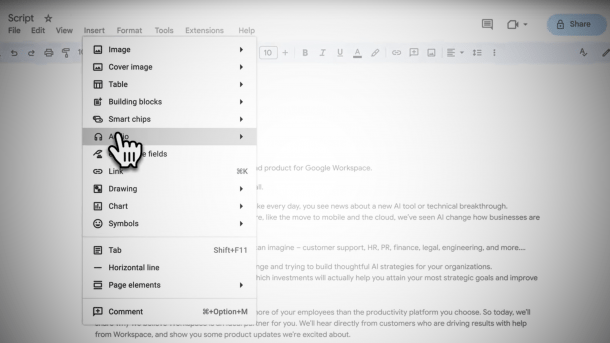
Audio function in Workspace: NotebookLM features integrated.
(Image: Google)
Alphabet is a large, sometimes confusing company. It can sometimes happen that one department doesn't know what the other is doing – or at least doesn't (co-)use products and features that have long been available in good quality within the company, or does so late.
For example, the subsidiary YouTube still “shines” with a robotic translation function for texts and voices that is hated by countless users, even though the company manages to achieve almost perfect speech generation both as part of its Gemini AI system and in the NotebookLM podcast feature. However, customers of the Workspace office package can now rejoice: the team led by Product Vice President Kristina Behr has taken a leaf out of Alphabet's “good” book to implement a new audio feature.
Prompting and “call-in” not initially planned
The function is in Docs, Google's Word version, and will initially be rolled out as an alpha over the coming weeks. A specific name has not yet been found: The Workspace team calls it “Audio”. Users who can already test the feature can find it in the “Insert” area. If you click on “Audio” here, you can either have the text read aloud (“Listen to this tab”) or create an audio overview (“Audio Overview”). Google uses the same term as in NotebookLM, where the podcasts also have this name. However, the “hosts” are supposed to be different from those in NotebookLM – but we were unable to listen to them at first, and even an official demo video published on YouTube is confusingly soundless.
Videos by heise
As we know from NotebookLM, creating the audio overviews can take several minutes. Prompting with special commands – such as what the hosts should focus on – is not initially planned. (The feature has already been used in NotebookLM by prompt hackers to translate the podcasts into languages that are not yet officially provided – with varying degrees of success). Also, not (yet?) at the start is the impressive “call-in” function from NotebookLM, which allows you to interrupt the “hosts” at any time by voice. This allows you to get the AI personas to answer questions or explain a topic in more detail – which is an impressive feature that shows what voice AI can already do today.
Initially, only a “Refresh” button is integrated in the alpha to regenerate a listening overview, for example when new textual content has been added to the document. The NotebookLM podcasts always consist of the source material that is presented to the system. Docs in Workspace uses only the content of the current document. But even that can be interesting: for example, NotebookLM even manages to narrate the user's credit card statement in an exciting way. It remains to be seen how much of this AI creativity will find its way into Workspace. Docs also lacks NotebookLM's web connection.
Other new Workspace functions
Alphabet's cloud subsidiary Google Cloud, to which Workspace belongs, also announced further innovations to its office package at the Cloud Next 25 in-house exhibition in Las Vegas this month. These include new “agentic” workflows based on gems, which are designed to perform special AI tasks – such as hitting a company's marketing tone. In a demo, a “flow” was also demonstrated in which an incoming customer support request was automatically sorted by topic, core problem and possible solutions and suggested to suitable supporters.
This should then be completed “in one step”. Another AI function in Docs is “Help me refine”, in which Gemini serves as a “writing coach” and offers suggestions to users on how they can improve their texts “so that they become an effective communicator over time”, according to Google Cloud. The feature is also only coming as an alpha and initially in English. Finally, there is a new analysis wizard for the spreadsheet Sheets, which uses AI to recognize “important trends” in figures that the user may overlook.
Movie generator and new “@gemini” for chats
The movie generator Vids, introduced last year, should create better quality videos thanks to the new Veo-2 model)$. Google Meet, on the other hand, is getting a catch-up function: instead of just taking notes, Gemini can quickly summarize what was previously said – for example, if you are running late for a meeting. There are supposed to be different formats. The feature is commendably not planned as an alpha, but – will probably initially be available to all Workspace customers in English – before the end of this quarter. The chats integrated in Workspace can now also include Gemini in the discussion: To do this, simply type “@gemini” to address the assistance system. However, the function will initially only be made available to testers as part of Google Labs.
Users in the European Union already have new “data residency” options. This means they can specify where the Gemini AI system stores data as part of Workspace. This is important if a company wants to comply with the provisions of the GDPR. Google summarizes information on the use of data for training on a separate page, which was last updated at the end of March.


(mack)


