


iPhone 16: How Apple's new "camera control" works
There's a new shutter button for iPhone photos and videos. But there's more: thanks to the capacitive sensor, the new “camera control button” can do even more.
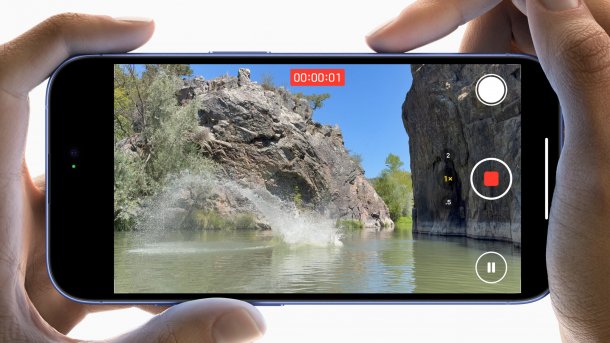
Camera control on the iPhone 16: Another button, but a useful one.
(Image: Apple)
Apple was once proud of how minimalist and buttonless the iPhone was – after all, the company even got rid of the popular home button with the iPhone X in 2017. But now there is a kind of buttonflation in all four variants of the iPhone 16: in addition to the action button, which also ends up in the two standard devices, each of the four new Apple smartphones has a new camera button. The button referred to in the rumour mill as the "Capture Button", which is officially called the "Camera Control", works capacitively based on touch and also detects contact pressure.
Takes some getting used to at first, then useful
The camera control is integrated on the right-hand side of the iPhone 16, i.e. below the Sleep/Wake button in the previously completely empty area. The size is between the Sleep/Wake button and one of the volume buttons on the left-hand side. Apple emphasizes the "thoughtful integration of hardware and software" in the button. It is said to be an innovative new way to "quickly open the camera, take a photo or start a video recording". Tactile feedback when pressed is provided by Apple's Taptic Engine, so the button itself does not move.
Videos by heise
The functions appear directly under the camera control on the screen. A new camera preview allows you to adjust options such as exposure, depth of field or zoom using a swipe gesture. Due to the size of the button, – - at least according to pictures from Apple's hands-on area after the keynote – - takes some getting used to at first, especially with slightly larger fingers. A second function, which uses the integrated pressure sensor, will only be implemented "in the fall" via an update. The camera control will then become a two-stage shutter release to initially set the focus and exposure by pressing lightly. "This allows users to adjust the image section and the subject remains in focus," writes Apple. This is reminiscent of similar functions in larger cameras that have been around for decades.
Not just for iPhone 16: iOS 18 innovations for the camera
There are also other interesting camera-related features in iOS 18. For example, you can now finally pause videos during recording in order to reposition yourself in the room – Previously, you had to stop the current recording and restart it. The video playback speed can be adjusted in the Photos app – This is extremely practical for 4K120 in the iPhone 16 Pro and 16 Pro Max, as it gives you more freedom in terms of composition.
For the first time, the iPhone 16 Pro and 16 Pro Max can also output photos in JPEG XL format, which promises smaller file sizes thanks to better compression. The feature was discovered in the code of the RC version of iOS 18, as reported by Macrumors; it has not yet been officially announced. Finally, iOS 18 can also record videos while audio playback continues.
Empfohlener redaktioneller Inhalt
Mit Ihrer Zustimmung wird hier ein externer Preisvergleich (heise Preisvergleich) geladen.
Ich bin damit einverstanden, dass mir externe Inhalte angezeigt werden. Damit können personenbezogene Daten an Drittplattformen (heise Preisvergleich) übermittelt werden. Mehr dazu in unserer Datenschutzerklärung.


(bsc)


