


Email categories in iOS 18.2: Not really intelligent
Apple has introduced the so-called mail categories with iOS 18.2. Users complain about incorrect sorting.
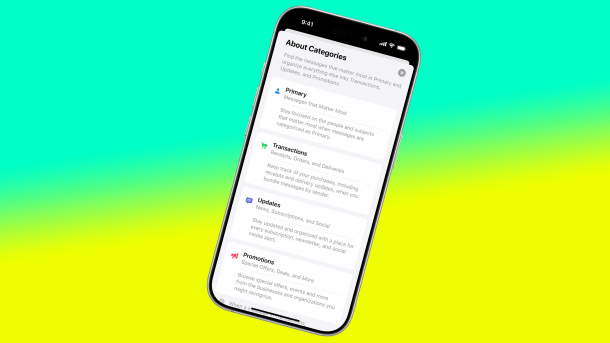
Categories in the Mail app under iOS 18.2: Not yet on Mac and iPad, but only of limited use.
(Image: Apple)
As part of iOS 18.2, Apple has implemented a new feature in its official Mail application that seems practical at first glance: The app can now automatically sort – incoming messages into different categories, even without Apple Intelligence –, in order to maintain a better overview. The function, called "categorization" in German, recognizes a total of four types of emails: "Primary" ("Urgent emails or the latest messages from contacts"), "Transactions" (such as payment confirmations and order updates, writes Apple), "Updates" (news newsletters and social media) and "Advertising" (advertising "from companies and organizations"). The problem: the sorting is not really accurate, in English as well as in German. If you have the feature active, you run the risk of missing important news.
"Primary" as a message center
As soon as the mail categorization is active, the "Primary" category becomes the message center that most users are likely to focus on. Conversely, this means that you pay less attention to the other categories, as you have to actively call them up. It is therefore important that the sorting works correctly. Unfortunately, this is not always the case in everyday use. In a self-experiment, some emails ended up in the "Advertising" category that definitely didn't belong there.
Videos by heise
It is then annoying that it takes a few steps to tell the app that it has made a mistake: You have to use the "..." menu to re-categorize the sender of the email (in the "Primary" section, this is possible via the Reply menu). However, Apple Mail will then only categorize the sender, not the content of the email: It may well be that you receive emails from a sender that are not "Primary".
Try it out first – Mac and iPad excluded
Overall, it makes sense to try out the email categorization first before leaving it active all the time. Apple is also likely to make internal improvements – However, it is unclear whether this will be possible outside of the next iOS update. If you don't get along with the categorization at all, it's best to switch back to the list view.
Apple itself does not seem to be entirely convinced by the feature. The company has so far only implemented categorization in iOS 18.2, but has not added it to iPadOS 18.2 and macOS 15.2. Most recently, there were again reports that Apple Mail is causing problems under iOS 18.2 and iPadOS 18.2 for other reasons: emails may not be retrieved reliably.
Empfohlener redaktioneller Inhalt
Mit Ihrer Zustimmung wird hier ein externer Preisvergleich (heise Preisvergleich) geladen.
Ich bin damit einverstanden, dass mir externe Inhalte angezeigt werden. Damit können personenbezogene Daten an Drittplattformen (heise Preisvergleich) übermittelt werden. Mehr dazu in unserer Datenschutzerklärung.


(bsc)


