


KeyCue 11: Learn keyboard shortcuts on the Mac with a new look
Many macOS apps can be operated more quickly using the keyboard than the mouse. KeyCue 11 knows them for all programs and now displays them more clearly.
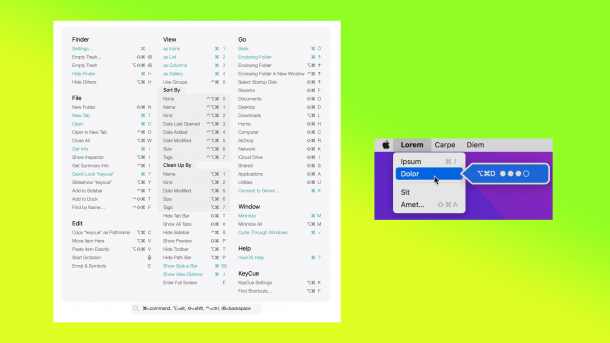
KeyCue 11 on the Mac: View shortcuts, set shortcuts.
(Image: Ergonis)
The Austrian developer Ergonis has updated its useful keyboard tool KeyCue for macOS. The tool makes it possible to display which keyboard shortcuts are available for a currently open app at the touch of a button or via the menu bar – plus (if available) macros and system-wide shortcuts. The app can also store new keyboard shortcuts for commands directly in the system if they do not yet exist.
Revised design
The tool interface has been improved with KeyCue 11. It is now more modern, contains new dark and light themes and a new activation menu. Unicode 15 is fully supported, and the app has been optimized for macOS 15 alias Sequoia. The settings can be reset to default with a single click. In addition to Command, Control, and Option, FN, the dictation key and Apple's GlobalKey can also be used to call up the app.
Videos by heise
KeyCue is usually used by going to the desired app and then holding down the Command key (Apple) for a little longer. KeyCue then displays all available keyboard shortcuts and also offers a search function. The purpose is to learn the commands for yourself or to be able to call them up more quickly. It is also possible to create new shortcuts directly in the menu bar. This is otherwise only possible via the system settings. To do this, you use a KeyCue shortcut and tap the desired combination. The app also has an integration for various macro apps such as Keyboard Maestro, whose keyboard macros it can display.
Single price or subscription
The license system was also changed with KeyCue 11. A single purchase for the current version costs 39.99 US dollars (without update capability). Otherwise, you pay either 19.99 dollars per year for 2 devices or 39.99 dollars per year for a business license with 5 devices. Ergonis also offers enterprise licenses on request.
If you don't like the themes used for KeyCue – of which a whole range are supplied – you can also create your own. For apps that have too many keyboard shortcuts, KeyCue also offers its add-ons, for example for Teams, Adobe Photoshop or Notion.
Empfohlener redaktioneller Inhalt
Mit Ihrer Zustimmung wird hier ein externer Preisvergleich (heise Preisvergleich) geladen.
Ich bin damit einverstanden, dass mir externe Inhalte angezeigt werden. Damit können personenbezogene Daten an Drittplattformen (heise Preisvergleich) übermittelt werden. Mehr dazu in unserer Datenschutzerklärung.


(bsc)


