


Firefox: Tab groups are here
Firefox continues to work on user requests: In the current version 138, it's the turn of tab groups. A new profile management system is also on board.
(Image: Mozilla)
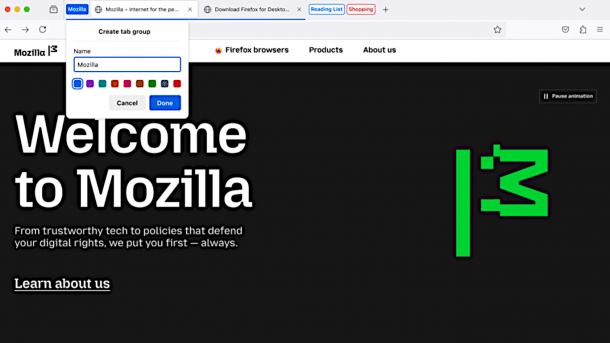
Tabs can now be organized into groups in Firefox. This highly requested function is part of the new version 138, which is now available. Users can easily set up new groups: They simply drag a tab onto another tab, after which the browser presents a suitable menu. The name of the group – for example its purpose, a topic, or a date – and a color can be assigned. The name is optional.
If users want to remove a tab from a group, they can simply drag and drop it into the tab bar. Groups can be further configured with a right-click, for example to open a new tab directly in a group, move the entire group to a new browser window, save and close the group, delete all tabs from it or remove them. Groups can be moved in the tab bar like conventional tabs.
Simple management
The tab menu also shows an overview of the existing groups and the tabs they contain. The new groups also work with the recently introduced vertical tab mode and existing add-ons for managing tabs. Mozilla wants to give third-party developers access to the group function with new APIs so that Firefox extensions can handle them correctly. An AI assistant, which runs locally and is already included in the nightly version, is also a must these days. It is intended to further simplify the management of tabs, but there are no details on this yet.
Mozilla itself points out that the tab groups were one of the features most requested by users. There has been a request for them on the Connect community platform since 2022, with thousands of votes for the feature. According to the developers, they have tried to implement these requests as well as possible – although the users' ideas were sometimes contradictory. Mozilla therefore wants to have identified the needs behind the wishes expressed and then built them into Firefox.
New profile management
At the same time, Firefox is introducing a new profile management system: It allows users to configure their browser for different purposes, for example for work and home or specifically for shopping. The appropriate profile can be selected when starting the browser, after which the bookmarks and history saved here and, if applicable, the data synchronized via the Mozilla account are available. However, the data protection and privacy settings are separate from the profiles.
Videos by heise
The developers have also made several security fixes and many minor changes. Details can be found in the release notes of the new version 138. Mozilla also warns users that in some cases the import wizard will no longer import passwords from Chrome and Chromium-based browsers. Affected users must export their passwords as a CSV file and import them manually using the Firefox Password Manager.
Google has also updated its Chrome browser, although version 136 does not include any major new functions apart from bug and security fixes.


(fo)


