


"Transfer to iOS": Apple accelerates iPhone change app for Android
With "Transfer to iOS" you can switch from Android devices to iPhones. The app now has some improvements.
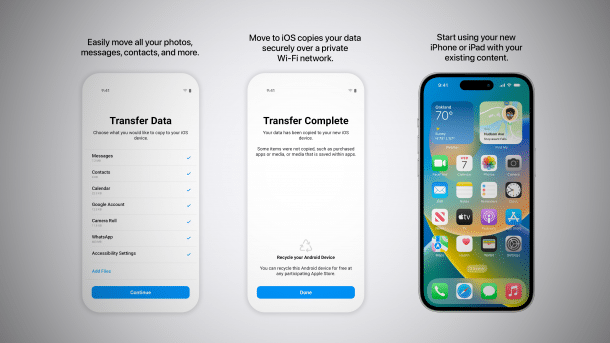
Using Apple's Android switching app: it's now quicker via cable.
(Image: Apple)
Apple has placed an improved version of its iPhone migration app for Android, "Move to iOS" or "Transfer to iOS", in the Play Store. The 4.0.2 update, which has been available for a few days, is intended to speed up the transfer of data and improve the "general user experience", among other things, as the iPhone manufacturer states in its instruction leaflet.
Cable and personal hotspot also possible
"Transfer to iOS" is used to transfer central content and settings from an Android device to an iPhone. This includes contacts, calendars, Google accounts, photos, WhatsApp content, accessibility settings, messages and more. Some areas are excluded for technical reasons, but the amount of data is usually a good starting point for Android switchers to the iPhone. "Transfer to iOS" in version 4.0.2 can now migrate data faster when iPhone and Android device are connected via cable – a function already known from iPhone to iPhone.
Technically, this should work with both USB-C and USB-C-to-Lightning cables, although you should not use pure charging cables with USB-C-to-USB-C connectors, as these only enable slow data transfer. Alternatively, you can also establish a connection via Wi-Fi or a personal hotspot provided by the iPhone.
Videos by heise
Call history(ies), SIM labels and voice memos
Another new feature is that the call history can now be transferred, a feature that was previously missing. If several SIM cards are stored, their labels are now also transferred to the iPhone. Finally, voice recordings can be migrated from the Voice Memos app and the Files app, although this has to do with the file format used, according to Apple.
Ten new languages from South Asia have also been added to the app, including Punjabi, Urdu, Tamil, Odia and Telugu. "Transfer to iOS" can be downloaded for free from the Play Store and works with many newer iPhones. Apple has published instructions on how to use it, although this does not yet include the latest app version. Transfer to iPads is also possible.
Empfohlener redaktioneller Inhalt
Mit Ihrer Zustimmung wird hier ein externer Preisvergleich (heise Preisvergleich) geladen.
Ich bin damit einverstanden, dass mir externe Inhalte angezeigt werden. Damit können personenbezogene Daten an Drittplattformen (heise Preisvergleich) übermittelt werden. Mehr dazu in unserer Datenschutzerklärung.


(bsc)


