


Figma2025: Websites and responsive layout via AI
The Figma design tool receives a range of new tools to generate websites and apps using AI. It also automates content production for marketing.
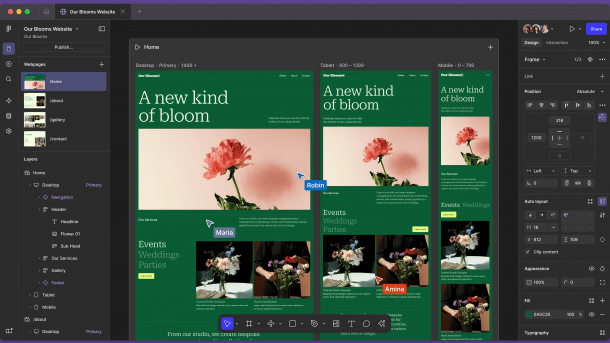
In future, FIgma will be able to create responsive websites with the help of artificial intelligence.
(Image: Figma)
Figma is used to create UI/UX (user interface/user experience) designs for websites as well as web and mobile apps. The software is available for Windows, macOS, Android and iOS and is structured like a drawing or typesetting tool for graphic designers. However, the company also involves software developers.
The core product Figma Design creates visual front-ends for apps and websites that can be exported as SVG, JPEG or PDF files. In dev mode, developers can convert the designs into code and enrich them with automatically generated code. The FigJam online whiteboard supports brainstorming sessions, workshops and meetings. Interactive presentations are created in Figma Slides.
Figma continues to compete with Adobe XD, which the manufacturer has hardly developed any further recently. However, Figma will not become part of the graphics group: Adobe canceled the takeover of the company announced in 2022 for 20 billion US dollars at the end of 2023.
The new tools briefly
The 2025 product update adds a range of new tools: Figma Sites and Make create interactive websites and simple applications. Draw adds drawing tools, Buzz creates brand-compliant content such as social media posts and Grid produces responsive layouts with CSS code.
The tools largely rely on generative AI. One risk of the prompt-to-code tools Figma Make and Sites is the black box nature of the generated code, which is undocumented and therefore difficult to maintain. However, it could be useful for initial prototypes.
Videos by heise
Figma Sites: Websites without developers
With Figma Sites, designers should be able to create dynamic websites. The tool replaces the usual break in the workflow where static designs have to be manually translated into code by developers. Sites promises to build responsive layouts with ready-made components, templates and animations – either using your own code or via AI-generated interactions from simple text commands. An integrated CMS aimed at designers and marketers is set to follow later in the year.

(Image: Figma)
Figma Make: app via text prompt
Figma Make generates functional prototypes or simple applications from existing designs, i.e. the interface including code. The manufacturer integrates the Claude 3.7 AI model for this purpose, allowing properties such as font size or text spacing to be adjusted. This should save the work of a development team in the early stages of development.

(Image: Figma)
Figma Draw: vector graphics for designers
With Draw, Figma complements illustration tools such as Lasso, Shape Builder, Brush, Textures or Text-on-Path. It is integrated into Sites, Slides and Buzz. Variable line width will follow soon. Draw thus eliminates a well-known gap in the workflow: until now, designers had to use external tools such as Illustrator or Affinity Designer for complex illustrations.

(Image: Figma)
Figma Buzz: Content for marketing teams
Buzz is designed to help marketing teams create social media posts, advertising materials or presentations in large quantities without designers having to touch individual pieces of content. Designers first create CI-compliant templates. Artificial intelligence is used to generate suitable images and layouts.

(Image: Figma)
Grid: CSS-oriented layouts
The new grid is intended to help create responsive layouts such as galleries or content overviews. Columns, rows and cell contents can be configured. Content can be distributed across the grid cells, even across multiple cells. The automatically generated CSS code can be displayed in the Figma tool dev mode.
Generative AI: Figma integrates ChatGPT
Artificial intelligence is designed to automate repetitive tasks and speed up creative processes. Figma integrates ChatGPT, for example to generate placeholder texts. Images can also be created or edited using the prompt. This should make it possible to retouch motifs, extend backgrounds or change styles. The AI tools are available in Figma Design, FigJam, Slides, Sites and Buzz as a beta version for users with a paid account.

(Image: Figma)
Prices and availability
The manufacturer intends to introduce the new products and functions gradually. The free starter plan includes basic design, presentation and brainstorming tools as well as UI kits and templates. There are three subscription models for freelancers and small teams. The Collab license for 3 euros per month includes the FigJam and Figma Slides tools. The Dev license for 12 euros per month includes the Dev Mode. The full license for 16 euros per month includes all programs. For companies, the subscriptions cost 5, 25 and 55 euros respectively. Figma is free for pupils, students and teachers.


(akr)


