


macOS 26 Tahoe: Redesign and new version scheme
The next version of macOS will have a new "Liquid Glass" design with more plasticity. Apple is also switching to a version number with a year.
The code name of macOS 26 is "Tahoe".
Apple announced the next version of the Mac operating system at the WWDC 2025 keynote. As was already suspected last week, Apple is continuing to assign nicknames with reference to California: The upcoming version is called macOS Tahoe. It is named after the largest mountain lake in North America, Lake Tahoe on the border between California and Nevada.
Apple is also changing the version scheme to years instead of consecutive numbers. So instead of macOS 16, the next upgrade will be called macOS 26.
Videos by heise
Major redesign across all platforms
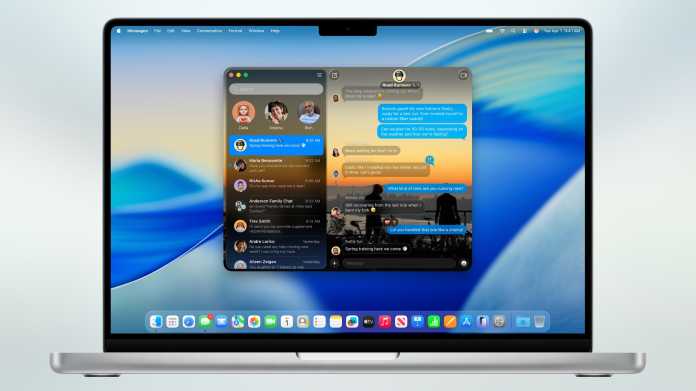
The glass WWDC logo already hinted at it: Apple is modernizing the interface of macOS and making it a little more vivid again with a translucent glass look as well as light, shadows and glass-like distortions on the window edges and controls. The design, called "Liquid Glass", is inspired by visionOS and will be similar across all systems. It's not just the windows that macOS consistently shows in glass, but also icons, buttons and menus. There are also more animations. The menu bar has no background and the menu commands float directly above the background image.

A special "Clear Look" gives the entire OS a continuous glass look if desired, without any colors. Icons and text then look like they have been engraved in glass. There is also a special dark mode familiar from iOS, with monochrome tinted icons.

The last major overhaul was macOS 11 Big Sur in 2020, when Apple also largely abandoned plastic elements such as buttons on the Mac.
More customization
Until now, the Control Center had to be configured via the system settings. In macOS 26, this can be done interactively and, as with iOS/iPadOS, you have significantly more freedom. You can also color folders in the Finder without additional tools and add icons to them.
macOS 26 Tahoe (18 Bilder)
Apple Intelligence
Apple Intelligence has hardly impressed since its launch last year, even after various updates. Siri is said to have been slightly improved in the new systems, but Apple is putting off the completely revised Siri for another year – as suspected –. Apple Intelligence supports a few more languages, and developers can access Apple's local Large Language Model for the first time via the "Foundations Models Framework" and use it in their apps. Applications can be integrated into Apple Intelligence via App Intents, for example to search for marked image elements via Visual Intelligence.
Shortcuts
Users can now use Apple Intelligence in their shortcuts and specify whether the local LLM, Apple's Private Cloud Compute or ChatGPT (if activated) should be used. Variables can be integrated into the prompts so that the AI can, for example, summarize a transcript of an audio file in one step.

The automations familiar from iOS/iPadOS are finally coming to the Mac. They make it possible to execute shortcuts automatically. This is not only time-controlled, but also works for certain events such as connecting a screen, changing files or receiving messages from certain senders.
Spotlight with clipboard history
In the revised system search, four buttons next to the search field provide direct access to Mac apps and iPhone apps, recently used documents, shortcuts and the clipboard. The window can apparently be scaled to any size, including width. A tab bar allows quick filtering by document type.

Spotlight can execute application functions directly and specify parameters for shortcuts. For example, an e-mail can be sent directly to a specific recipient in the search window or a recording can be started in voice memos. With "Quick Keys", macOS offers 26 shortcuts to call up commands with just a few letters, such as "sm" for "send message". Finally, the menu bar of the active application can be searched via Spotlight to execute commands directly.
Previously, you could only access previously copied content via clipboard managers that had to be installed separately. Now Spotlight comes with its own clipboard history.
To enable Spotlight to address app functions, developers must integrate app intents. The shortcuts then also benefit from this.
Continuity & phone app
Apple has once again refined the collaboration between the systems. For example, macOS now displays the live activities of iPhone apps in the menu bar. With a click, the corresponding app opens directly on the Mac via iPhone synchronization (iPhone Mirroring). Apple had already introduced this function with macOS 15 Sequoia, but it is not yet available in the EU. It is not yet clear whether this will change with macOS 26.
The new Phone app provides access to recent contacts or voicemails. You can also start calls directly, which are still handled by the iPhone. New features of iOS 26 such as live translations are also on board.
Gaming and Metal 4
The new Games app bundles all games on the Mac in one place. During a game, system settings can be adjusted via overlay, friends can be invited to play along via Game Center or chat with them. With Metal 4, developers benefit from new rendering functions such as frame interpolation and denoising.
Further innovations
- Apple Music gets improvements such as live translation of lyrics and notes on intonation. There is also an AI-supported automix function that mixes songs like a DJ to create a continuous soundtrack.
- In future, chats in iMessages can be provided with individual backgrounds. You can also create surveys.
- Notes can be exported as a Markdown file.
- Passwords now remembers changes so that you can access a previously used password.
- Using Apple Intelligence, reminders suggest tasks or purchases, for example based on emails. The app can also automatically create sections.
- The diary app Journal appears on the Mac with macOS 26.
- Families have more extensive controls for children's accounts, such as for the App Store or communication limits.
Improved accessibility
Part of macOS are the new accessibility features announced in mid-May. For example, macOS 26 brings the Magnifier app to the Mac for the first time and uses iPhone or USB cameras for live magnification. The new Accessibility Reader offers a system-wide reading mode with individual font design. Vehicle motion cues visually indicate movements to prevent motion sickness. Braille support is being expanded and Macs will be able to open files in Braille Ready Format (BRF) in future. Eye and head tracking enable alternative control without a mouse or trackpad. In future, the Mac App Store will display accessibility labels that provide information about supported accessibility features before downloading. Finally, accessibility settings can be shared with other devices.
Hardware requirements
The rumors that Apple would remove support for some Intel Macs with macOS 26 Tahoe have unfortunately come true. Five years after the introduction of Apple Silicon Macs, only a few x86 models remain:
- iMac 2020
- Mac Pro 2019
- MacBook Pro 16" from 2019
- MacBook Pro 13" from 2020 with four Thunderbolt 3 ports
The following Intel models are no longer supported:
- iMac 2019
- iMac Pro 2017
- Mac mini 2018
- MacBook Air 2020
- MacBook Pro from 2018
- MacBook Pro 13" from 2019 with two Thunderbolt 3 ports
All supported models:
- iMac from 2020 (Intel and Apple Silicon)
- Mac mini from 2020 (Apple Silicon)
- Mac Studio from 2022 (Apple Silicon)
- Mac Pro from 2019 (Intel and Apple Silicon)
- MacBook Air from 2020 (Apple Silicon only)
- MacBook Pro 13" from 2020 (Intel and Apple Silicon)
- MacBook Pro 16" from 2019 (Intel and Apple Silicon)
Availability of macOS 26 Tahoe
The final version of macOS 26 will be released to end customers in the fall. Developers can install the developer beta from today. The freely accessible public beta will be released in July.


(wre)


