


Apple Intelligence in shortcuts: What the Apple models under iOS 26 can do
Apple's Shortcuts app is getting AI elements. However, the devil is in the details.
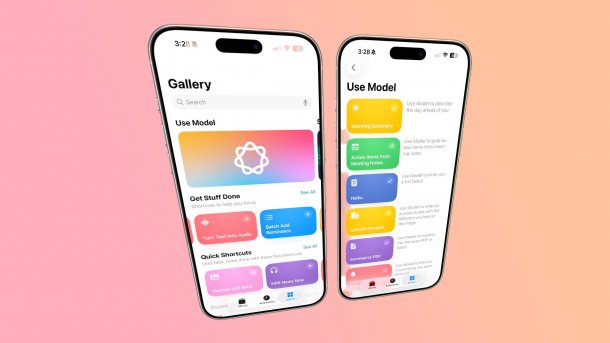
Shortcuts with AI in iOS 26: Not a chatbot, of course.
(Image: Mac & i / Screenshot via Macrumors)
It was already a foregone conclusion that Apple's popular automation tool “Shortcuts” would have AI capabilities in the future. There is now some information on how the app, also known as shortcuts, can interact with Apple's in-house models. There are three levels: Local model, which does not leave the device, Cloud model, which runs on Apple's Private Cloud Compute (PCC) servers, and ChatGPT from OpenAI. Some shortcuts can be used to do things that the operating system itself did not allow within iOS 18.
Open questions about the model
In principle, the AI commands are available in the Shortcuts app on iPhone, iPad, and macOS – all from September in the new versions 26. However, developers can already perform them as part of the current beta tests. The ready-made shortcuts include those for summarizing PDFs, creating haikus or ASCII art, outputting recipes when entering existing food or creating “action items” from meeting notes.
Videos by heise
Shortcuts can also compare documents with each other, explain how to use the models and create a “morning summary”, which displays the most important appointments of the day in an overview. The models also allow you to create your own shortcuts that use Apple's image generators or access Visual Intelligence. Data sources can also be tapped into, including the calendar, reminders or the weather app.
Programming is still done in-house
Access to Apple's well-known writing tools is also possible. What is interesting is that you can also ask open questions, something that Apple otherwise prevents on its models. Shortcuts also offers the first opportunity to compare the different Apple models (i.e., on-device versus PCC) with each other.
However, creating a shortcut from just one prompt does not seem to be planned for now: So you create a shortcut as usual, just use one of the AI models in it and don't “program” with it. It is interesting to examine the ready-made AI shortcuts that Apple provides – where you can learn how best to use the technology.
Empfohlener redaktioneller Inhalt
Mit Ihrer Zustimmung wird hier ein externer Preisvergleich (heise Preisvergleich) geladen.
Ich bin damit einverstanden, dass mir externe Inhalte angezeigt werden. Damit können personenbezogene Daten an Drittplattformen (heise Preisvergleich) übermittelt werden. Mehr dazu in unserer Datenschutzerklärung.


(bsc)


