


iOS 26: Quickly snooze – Trouble with new alarm clock
If you are woken up by an iPhone with iOS 26, you may have a problem: the button design is rather unwise.
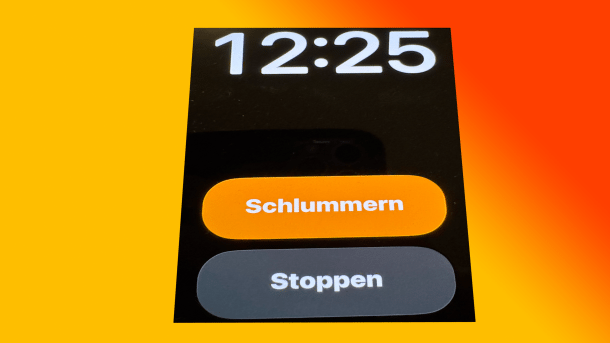
Alarm clock function in iOS 26: Where do I press here?
(Image: Mac & i)
Beta testers of iOS 26 should be very attentive if they let their iPhone wake them up – as many people do –: Apple has not necessarily revised the design of its alarm function in the new iPhone operating system for the better. As part of the new “Liquid Glass” design, two buttons of different sizes, as in iOS 18, have been turned into two buttons of the same size, which are also directly below each other (see image above). This means that you have to look very carefully at what you are pressing when you are sleepy. Otherwise, you will deactivate the alarm clock instead of starting snooze mode.
Badly slapped on the screen
Jack Fields, a former Apple engineer, sums up the criticism on X: “This new design is … interesting.” The stop button is “frighteningly large”. Interestingly, this design had been reviewed by Apple itself in the past: Fields was involved. “This goes against the research I was involved in [at the time].”
Videos by heise
Apple found that with buttons of the same size, oversleeping occurred in up to 30 percent more cases – users simply stopped the alarm instead of activating snooze. “During the test phase, we had a version of the watch app that logged all touch gestures in a heat map. It recorded where our tired hands slapped the screen to see how accurately we landed when we turned off the alarm. Turns out we're pretty bad at it.”
It's still only a beta
At least, Apple has integrated an improvement to the alarm clock in iOS 26: You can now set the length of the snooze mode – from one to 15 minutes. Currently, it is always nine minutes. However, this is of little help if you switch off the alarm completely. The new user interface with the larger button does help to operate the app. The only question is how much the operating error rate will increase.
In the past, Apple has repeatedly had problems with the iPhone alarm clock – partly due to operating errors. iOS 26 is currently available in the second developer beta. It is quite possible that Apple will revise the look of its alarm clock once again. The glassiness of the control center was recently reduced to make it easier to read.
Empfohlener redaktioneller Inhalt
Mit Ihrer Zustimmung wird hier ein externer Preisvergleich (heise Preisvergleich) geladen.
Ich bin damit einverstanden, dass mir externe Inhalte angezeigt werden. Damit können personenbezogene Daten an Drittplattformen (heise Preisvergleich) übermittelt werden. Mehr dazu in unserer Datenschutzerklärung.


(bsc)


