


Adobe Premiere Pro: new effects, transitions and animations
Adobe Premiere Pro will in the future include the GPU-accelerated effects of the Film Impact software, which was previously available as a plug-in collection.
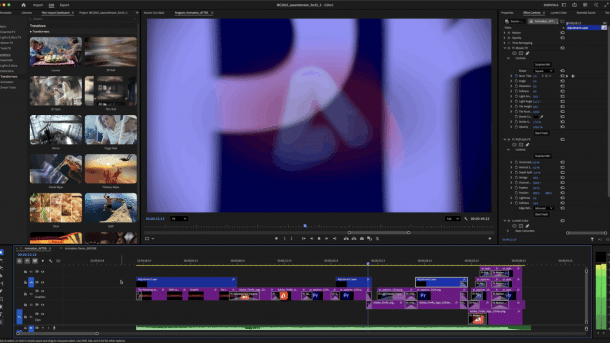
Adobe Premiere Pro 25.5 includes transition effects from the Film Impact plug-in collection, such as this blur animation.
(Image: Adobe)
Adobe has announced an update for Premiere Pro. Version 25.5 comes with over 90 new effects, transitions, and animations, which the software manufacturer has integrated into its video editing after acquiring the company of the same name from the Film Impact plug-in suite. Adobe is also expanding its audio editing and Premiere Pro. In the animation software After Effects 25.5, Adobe has improved the handling of keyframes.
Film Impact effects for Premiere Pro
The heart of the update to Premiere Pro 25.5 is the integration of the Film Impact library. The software previously offered an extensive collection of GPU-accelerated effects and transitions as a plug-in suite: Grow FX makes text titles grow, Stroke FX draws contours around objects, Long Shadow FX makes long shadows fall, Rounded Crop FX ensures smooth cropping, Directional Blur creates a transition effect with blurring. A camera shake effect makes tripod shots look as if they were taken on the shoulder. Adobe promises photorealistic bokeh, volumetric rays, vignetting, halos, and highlights. Red, green, and blue channels can be moved independently of each other to correct the colors.
Videos by heise
Adobe has seamlessly integrated the Film Impact tools into the Premiere Pro interface. They can be found in version 25.5 in the Effects Library under Video Transitions. Film Impact uses the CUDA, OpenCL, and Apple Metal libraries to display effects smoothly and render them quickly. They should run in real time as soon as you drag them onto an object with the mouse. According to Adobe, the goal is a response time of less than 0.1 seconds after the play command.
A “Surprise Me” button encourages experimentation. The animation of text, video, and graphics via drag & drop in Premiere Pro is intended, among other things, to save the tedious familiarization with After Effects and work with keyframes.

(Image: Adobe)
Extended format support
On Nvidia Blackwell GPUs, Premiere Pro offers hardware acceleration with H.264 and HEVC codecs at 10-bit color depth and 4:2:2 color subsampling, and Canon Cinema RAW Light hardware acceleration for smoother playback and faster export.
Premiere Pro also supports the Arriraw HDE (High Density Encoding) format, which is designed to compress to 60 percent of the original file size.
Workflow improvements in After Effects
Adobe is introducing “Quick Offset” in After Effects 25.5. With this tool, the positions of several keyframes or layers can be marked and moved simultaneously. Previously, you had to click and move each layer individually.
Adobe has optimized the cache for zoom and navigation in the Comp Viewer, thereby speeding up the preview.
Prices and availability
According to the manufacturer, the updates to Premiere Pro 25.5 and 5 and After Effects 25.5 will be available for download for Creative Cloud customers on September 12, 2025.
The complete Creative Cloud Pro subscription with access to around 20 desktop applications, including Photoshop, Illustrator, Adobe Express, Premiere Pro, and Acrobat Pro, costs 78 euros per month. A single subscription to Adobe Premiere Pro costs 26 euros per month.


(akr)


