


Comment on macOS 26 Tahoe: Stop, Apple, I want to get out
Every year Apple delivers a new macOS from – and every year you wish you had more time. It's particularly bad with Tahoe, says Ben Schwan.
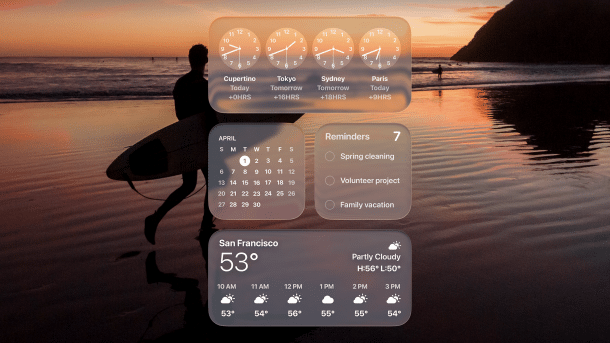
macOS 26 with barely legible "Clear Look" widgets: Didn't design used to be how things worked, Apple?
(Image: Apple)
After installing macOS 26 alias Tahoe for the first time, I was still positive: the new glassy look is kind of nice. The new Spotlight with integrated clipboard manager and automation functions seems useful, and the new telephony app will also help me in everyday life, I thought to myself. Then I got into the details and ended up spending two days trying to find various features that Apple had moved to different places for some inexplicable reason, even though they clearly belonged in the same system settings.
Keyboard misaligned – why not
And, mentally repressed again: I also unceremoniously locked myself out of my computer because the keyboard settings in the lock screen had been changed at startup—and I didn't notice at first that the German keyboard layout was inactive and therefore went into the “Locked, please wait 15 minutes” state. I haven't even tried any special apps yet—something hardware-related, which I'm sure is likely to cause some trouble currently because it happens every year or incompatibility warnings have already been issued for Tahoe.
Videos by heise
But what I don't understand above all is this: Why do Apple's developers do this to themselves, having to come around the corner with a new macOS every damn year? Mac release dates, unlike those of the iPhone, are now wildly distributed throughout the year, which means that a new macOS is not really a reason to buy a new Apple computer. But I fear that the switch to the annual naming scheme will now mean that there will never be any more time between two macOS releases (as there once was between Panther and Tiger or Leopard and Snow Leopard)—or just “zero new functions” and only bug fixes. How are you going to explain to people that they should still be using “macOS 28” in 2030, for example?
Apple's trap—and occupational therapy for users
So Apple has maneuvered itself into this trap and has to deliver. Every year at WWDC in June, there will be a new macOS for the foreseeable future. In 2025, Liquid Glass was a particularly big hit. The interface was to be adapted more to the iPhone and iPad, resulting in more rounded windows, remodelled icons (the old ones are stuffed into strange “windows”), a barely legible menu bar, and , if desired, transparent icons. Developers have to customize their apps so that they can shine in the new look, which nobody had actually demanded from Apple. (Rather than better AI functions).

As Apple only grants all security updates to the latest macOS version, you will have to switch to Tahoe in the short term, for better or worse. Professionals like to do this from version .2 at the earliest, so that the worst bugs are fixed. All in all, however, this is a form of occupational therapy—for everyone. Apple's developers are forced internally to invent new macOS features every year; developers have to adapt their apps so that they continue to run correctly; and users have to deal with the upgrade process, which, as mentioned, regularly leads to incompatibilities. One solution would be to reduce the macOS cycle to, say, two years. But Apple is making no attempt to do this. Instead, it updates year after year, for better or worse. I hardly believe what I'm saying, but couldn't Apple just take a leaf out of Microsoft's book and release new major versions every few years? So that we can take a deep breath with a clear conscience? After all, we use our Macs for work. And this work rarely needs additional occupational therapy.
Empfohlener redaktioneller Inhalt
Mit Ihrer Zustimmung wird hier ein externer Preisvergleich (heise Preisvergleich) geladen.
Ich bin damit einverstanden, dass mir externe Inhalte angezeigt werden. Damit können personenbezogene Daten an Drittplattformen (heise Preisvergleich) übermittelt werden. Mehr dazu in unserer Datenschutzerklärung.


(bsc)


