


Webmin 2.600: Largest UI Update for Server Management Software
The server management software Webmin is now available in version 2.600. The update brings the largest UI redesign in the project's history.
(Image: Webmin)
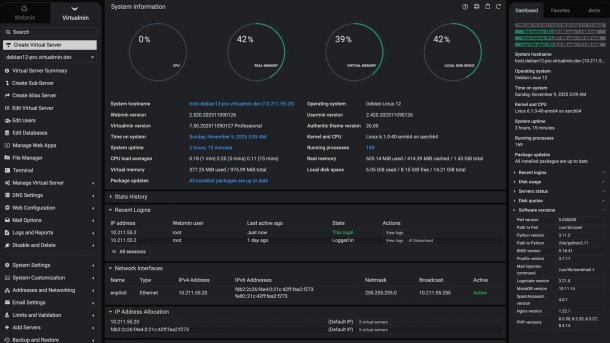
The developers of the web-based server management software Webmin have released version 2.600. In parallel, Usermin 2.500 also appeared. Both updates bring numerous innovations, most notably an extensive redesign of the user interface through the new Authentic Theme 26.00.
Webmin is an open-source administration tool for Unix and Linux systems that provides a web-based interface for system management. Administrators can use it to configure user accounts, services, firewalls, file systems, and other components via the browser. The software is primarily aimed at system administrators who want to keep servers comfortably under control without constantly having to work on the command line.
Completely Revised Interface
According to the developers, the new Authentic Theme 26.00 is the largest UI overhaul in the project's history. Almost every element of the interface has been reviewed and improved—from input fields and selection menus to buttons. The design aims for pixel-perfect precision across all Webmin modules that use the UI library.
Among the most prominent changes are rounded, floating menus and sidebars, as well as a tidy content area that extends from the top of the screen without a frame. The rounded corners can be deactivated in the theme settings, but the frameless design is firmly integrated. Some older options and niche functions have been removed, including the old page layout widget and the legacy layout mode. Layouts are now based entirely on columns and can no longer be reset.
The dark color scheme, in particular, has received a significant upgrade. The developers promote it with richer contrasts, softer tones, and an overall more balanced appearance.
New Functions for Database and Package Management
In addition to the UI update, the update to Webmin 2.600 includes practical extensions for daily admin work. The MySQL/MariaDB module now allows enabling the Slow Query Log, which facilitates the diagnosis of performance problems in databases. In the PHP configuration module, administrators can install multiple PHP extensions simultaneously, which speeds up the workflow.
Videos by heise
The Software Packages module now displays package URLs and, on Debian systems, supports displaying installation times. A new CLI function via the command webmin stats provides detailed statistics on the Webmin server, which can be useful for monitoring and automation.
Bugfixes for Fail2Ban and File Uploads
The developers have also fixed several errors. The Fail2Ban module now correctly saves jails with parameters containing quotation marks. In the Upload and Download module, a file is no longer always renamed as the effective user. Furthermore, a fatal error in the EOL library for operating systems under development has been fixed.
Webmin 2.600 and Usermin 2.500 are now available for download. The software can be obtained as an RPM package, DEB package, and tarball. For minimal installations, there is a reduced tarball version of 2.9 MByte.


(fo)


