


watchOS 26: Problems with the Action button on the Apple Watch Ultra
Apple's top watch, the Apple Watch Ultra, features a customizable Action button. Since watchOS 26, it hasn't always been reliable. Here's how to debug it.
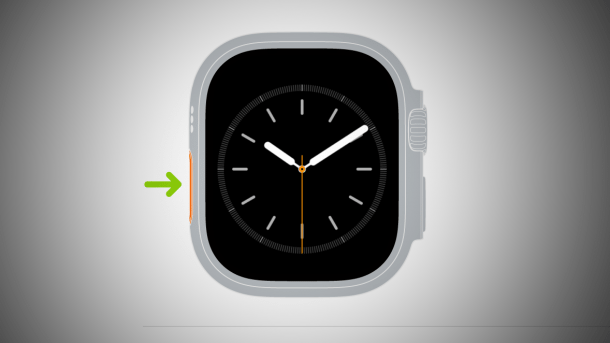
Action button on the Apple Watch: What to do if it malfunctions?
(Image: Apple)
Owners of the Apple Watch Ultra across all three generations are reporting issues with the orange-colored side button of the smart watch. After installing watchOS 26, it sometimes happens that the button indicates it has triggered the desired function upon pressing, but nothing occurs. Occasionally, the screen turns a solid color, and returning to the app grid is only possible by repeatedly pressing the digital crown. If you wait, an error message appears stating that the action cannot be performed.
What the Action button can do
The Action button, also known as the Action Button in English, is a third button located on the left side, exclusive to the Ultra model. All other Apple Watch models have only a digital crown (rotatable and pressable) and a side button, both located on the right side.
Videos by heise
The idea behind the Action button is to quickly trigger important functions, such as the stopwatch or training mode (the desired training is selected beforehand). A second press of the button triggers further app functions, and a long press of the button allows access to additional features via the so-called quick switch. Almost all important watchOS functions can be assigned to it.
Graphical glitches and freezing
Normally, the Action button works very reliably and can even be used to trigger automations via Shortcuts. With watchOS 26, in addition to the aforementioned triggering issues, graphical glitches have also appeared. The interface lags during the mentioned quick switch, and the selection frame cannot keep up with the digital crown inputs. Since Apple typically releases high-performance user interfaces, this appears quite unsightly.
Currently, there are no solutions for either the graphical glitches or the fundamental problem of the Action button freezing upon activation. If the Action button fails, it can generally help to restart the Apple Watch. However, this can take several minutes. After restarting, the Action button should work again. But it may stop working again later. watchOS 26.1 is aware of the issue; whether it is resolved in watchOS 26.2 remains to be seen.
Empfohlener redaktioneller Inhalt
Mit Ihrer Zustimmung wird hier ein externer Preisvergleich (heise Preisvergleich) geladen.
Ich bin damit einverstanden, dass mir externe Inhalte angezeigt werden. Damit können personenbezogene Daten an Drittplattformen (heise Preisvergleich) übermittelt werden. Mehr dazu in unserer Datenschutzerklärung.


(bsc)


