


New demo of the Flipper One: Tech gadget with DisplayPort and Ethernet socket
In a video, inventor Pavel Zhovner shows a working prototype. And it also serves as an Ethernet adapter for the smartphone.
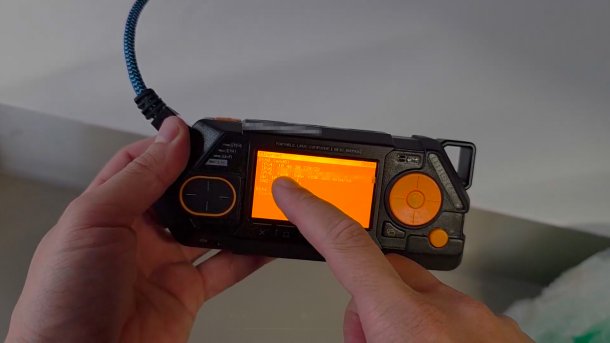
Prototype of the Flipper One
(Image: Telegram / Zhovner Hub)
There are new signs of life from the Flipper One. After developer Pavel Zhovner recently expressed doubts about the feasibility of his project due to exploding memory prices, he is now showing a working prototype in a video.
Unlike its predecessor gadget Flipper Zero (which has since found several imitators), the Flipper One is a complete Linux PC that, according to Zhovner, can also serve as a replacement for a desktop PC if necessary. The Flipper One supports DisplayPort and Ethernet – the latter even via a permanently installed port. The “One” is therefore not a successor, but a standalone device with a broader field of application.
Videos by heise
In the video demonstration, which presumably takes place in Zhovner's office, he shows the angular device in operation – the LC display glows in the retro amber style of its predecessor, the casing is black. After connecting to the network socket in the wall, the Flipper One receives IPv4 and IPv6 addresses via DHCP and, according to its label, can serve as a “Wifi Router” for the smartphone.

Flipper One in operation as an Ethernet adapter
(Image: Telegram / Zhovner Hub)
Wired Ethernet on the Smartphone
But that's not the point of the demonstration, Zhovner's voice explains. He wants “low latency” and “the maximum speed that an Ethernet cable provides,” says the tinkerer. And he connects his iPhone to the Flipper One via a USB-C cable. Via the USB interface, it in turn emulates an Ethernet adapter, which delivers a respectable 730 MBit/s in the speed test.
Whether and when the RK3576-based Flipper One, equipped with Linux, will be released is still unclear – as is the price of the device.
(generated with Whisper from the original Russian audio of the video with editorial adjustments)
[00:00.400 --> 00:11.860] Sometimes you're just tinkering around and suddenly you discover an Ethernet port in the wall and think: "Damn, there must be some really cool internet there, I wish I could use it from there."
[00:12.160 --> 00:14.780] And all you have is your phone.
[00:15.400 --> 00:19.420] How do you connect your phone to this Ethernet port? How do you get internet from there?
[00:20.180 --> 00:23.760] No problem, Flipper One comes to the rescue.
[00:23.760 --> 00:30.140] So we take the Flipper and connect the Ethernet here and there.
[00:31.180 --> 00:36.060] Oops! Let's see what we have on the screen. Let's wait.
[00:38.560 --> 00:43.900] Oops! We have an IP address and even IPv6, a real address.
[00:44.760 --> 00:48.940] Now we could just distribute the internet from here via Wi-Fi, right?
[00:48.940 --> 00:55.520] But that's not so great, because we would lose all the advantages of wired Ethernet.
[00:56.140 --> 01:00.180] Low latency, the full speed that a cable offers.
[01:01.020 --> 01:12.000] To leverage these advantages, we can connect Flipper directly to the phone via an Ethernet or USB cable.
[01:12.000 --> 01:15.780] Because Flipper can emulate an Ethernet adapter.
[01:16.140 --> 01:19.660] When I connect it to the phone, Ethernet is displayed.
[01:20.320 --> 01:23.600] So it emulates Ethernet over this USB cable.
[01:24.080 --> 01:26.740] And you can see that Wi-Fi is disabled on my phone.
[01:27.900 --> 01:29.800] Airplane mode – no effect.
[01:30.500 --> 01:32.900] Let's go to Speedtest.
[01:35.040 --> 01:36.460] And let's test the speed.
[01:40.920 --> 01:41.520] Boom!
[01:42.000 --> 01:43.420] Not bad, right?
[01:44.580 --> 01:47.260] You can also share your computer's internet connection in the same way,
[01:48.620 --> 01:52.000] if you don't have a USB Ethernet adapter handy.
[01:54.000 --> 01:55.240] Cool, I think.


(cku)


