


Adobe Firefly: AI assistant edits images
Adobe is expanding Firefly with an AI assistant that performs creative tasks via text input. The platform generates images and videos with 30 AI models.
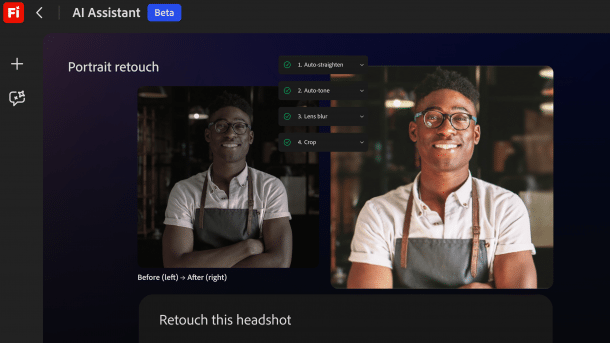
Adobe Firefly is to perform tasks such as portrait retouching based on text output in the future.
(Image: Adobe)
Adobe has expanded its AI platform, Firefly. A new AI assistant automates creative workflows within it. Users will no longer operate individual tools in the future but only describe what they want to achieve.
Videos by heise
An assistant instead of many tools
According to Adobe, the AI assistant independently performs several work steps that users previously had to complete manually and often in different programs.
Users enter the task in natural language. The assistant organizes work steps in the background, such as image editing, video editing, or audio adjustment. It is said to access various Adobe applications such as Photoshop, Premiere Pro, Illustrator, or Lightroom.
The assistant remembers the context of a project and should be able to pick up on previous decisions or content. This makes switching between programs unnecessary and simplifies getting started, according to the manufacturer.

(Image: Adobe)
Creative coordination with the assistant
Adobe emphasizes that users retain control: the assistant offers suggestions, asks questions, and allows for interventions. This is how language models are known to work.
The assistant uses templates for typical creative tasks, which can be customized or created by users themselves. Over time, the assistant learns the user's preferred tools, workflows, or visual styles.
The assistant also recognizes images, videos, or brand materials to make decisions based on them. Feedback from approval processes can be implemented automatically, according to Adobe, which should accelerate team coordination.
New editing functions for video and image
In addition to the assistant, Adobe is also expanding the editing functions in the Firefly web app. With “Precision Flow,” users can generate image variations from one input and choose between small adjustments and significant changes via a slider. With the “AI Markup” function, changes can be drawn directly in the image, for example, to place objects or change lighting. This is complemented by tools for fine-tuning image details such as exposure, contrast, saturation, and color temperature.
In the video sector, there are improvements in sound: the software automatically optimizes voice quality by reducing background noise, removing reverb, and highlighting dialogues. Users can adjust exposure, contrast, saturation, and color temperature in the video editor.

(Image: Adobe)
In addition, Adobe integrates its stock database, from which licensed videos, images, and sound effects can be incorporated into projects.
External AI models in Firefly
As part of the Firefly app, Adobe offers not only its image and video models but also integrates third-party AI. These include image models from Google, OpenAI, Black Forest Labs, and Luma AI, as well as video models Google Veo 3 and Luma AI Ray3. The selection now comprises over 30 models. Newly added are the video models Kling 3.0 and Kling 3.0 Omni, as well as Runway Gen-4.5.
Start of the test phase
The video and image tools, as well as the additional AI models, are now accessible as part of a Firefly subscription. Adobe offers the AI assistant as a public test version in Firefly.


(akr)


