


Image Playground: How Apple's image generator works
With iOS 18.2, Apple is making several image generators available to the developer public. They work slightly differently to the competition.
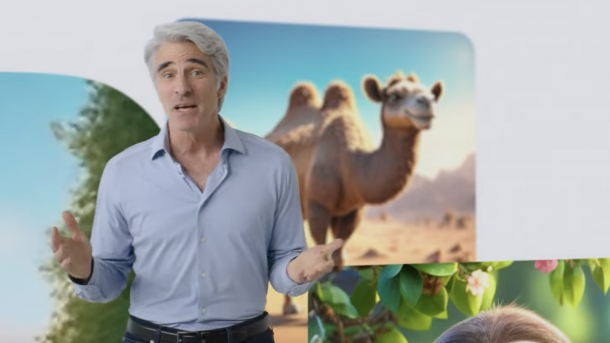
Apple Intelligence: image generator, demonstrated here by software boss Craig Federighi.
(Image: Apple / Screenshot Keynote)
Apple is being cautious this time. While it was possible to register for the text generation functions of Apple Intelligence in the developer beta of iOS 18.1, iPadOS 18.1 or macOS 15.1 relatively quickly, many interested developers are currently stuck in a waiting loop for the beta image generators added with iOS 18.2, iPadOS 18.2 and macOS 15.2. "We'll let you know when your access is ready," is the message. The new features are interesting, even if the layout seems somewhat random at first glance. This is because image generation within Apple Intelligence actually consists of three different areas: Image Playground ("picture playground"), Genmoji (generative emojis) and – for the iPad – Image Wand ("picture magic wand"). All three can now be tested in the developer beta of iOS 18.2 and iPadOS 18.2, Genmoji is still missing under macOS 15.2 Beta.
Image Playground as a picture center
The Image Playground app is the central point of contact. This is also where you sign up for the waiting list. After entering, you can type in a prompt at the top: "Describe an image". Words or sentences are then sufficient to trigger the image generation. You will then be given several images to choose from, which can take up to half a minute. Image Playground only provides illustrations, sketches and cartoon-like images, although sketches are not yet available. Apple wants to avoid generating deep fakes with photorealistic images. Finally, an existing photo can also be altered using Image Playground.
Videos by heise
Apple also offers various themes for this, including "Fantasy", "Adventure", "Disco" and "Summer". People can also be alienated in this way, and you can also put hats on them, turn them into superheroes or give them glasses. Another problem is the creation of text – where Image Playground, unlike other tools such as Ideogram, is usually off the mark. Image Playground images can also be created from the Messages app.
Image Wand and Genmoji
Genmoji is triggered via the emoji keyboard. There is a new "rainbow" symbol to start the editor. You can then prompt this and receive a generative emoji, which you can then send straight away. Interestingly, it also lands on devices without Apple Intelligence and can be saved there.
Finally, Image Wand is a function that brings the image generator known from Image Playground into the Notes app on the iPhone in order to add images to it. There is also a new magic wand in the pens section. iOS 18.2, iPadOS 18.2 and macOS 15.2 with the image generators should be released before Christmas. However, Apple Intelligence will not be available in the EU until April 2025, although there are tricks you can use to unlock the service now.
Empfohlener redaktioneller Inhalt
Mit Ihrer Zustimmung wird hier ein externer Preisvergleich (heise Preisvergleich) geladen.
Ich bin damit einverstanden, dass mir externe Inhalte angezeigt werden. Damit können personenbezogene Daten an Drittplattformen (heise Preisvergleich) übermittelt werden. Mehr dazu in unserer Datenschutzerklärung.


(bsc)


